ChatLog
Minecraft Java mod. Downloads from the MC Java Mods app on Android.
⬇ Download on CurseForge
ChatLog is migrating from CurseForge to its own website due to serious problems with file sharing and lack of crucial functionality on this platform. The downloads on this site will be kept online, but no new files will be uploaded. The installers provided on this site for this mod are not guaranteed to work. All versions of this mod can be downloaded from the new domain, varden.info.
Get vanilla versions here - direct link to latest version here
Get Forge versions here - direct link to latest version here
Get LiteLoader versions here - direct link to latest version here
Get OpenClassic versions here - direct link to latest version here
As always, ChatLog will remain free to download.
ChatLog
Ever been on a Minecraft multiplayer server, and someone says something? Yeah. Everyone who plays on a server must have heard someone saying something in chat. There is so much chat going around that you don't feel it's worth screenshooting, if you hadn't ever seen chat before I guess you could have done that.
But let's say another player connects, and he's desperate to know about what some random guy has said. You try to help him by scrolling up to the top of chat only to find that what was said had just been knocked off the chat history.
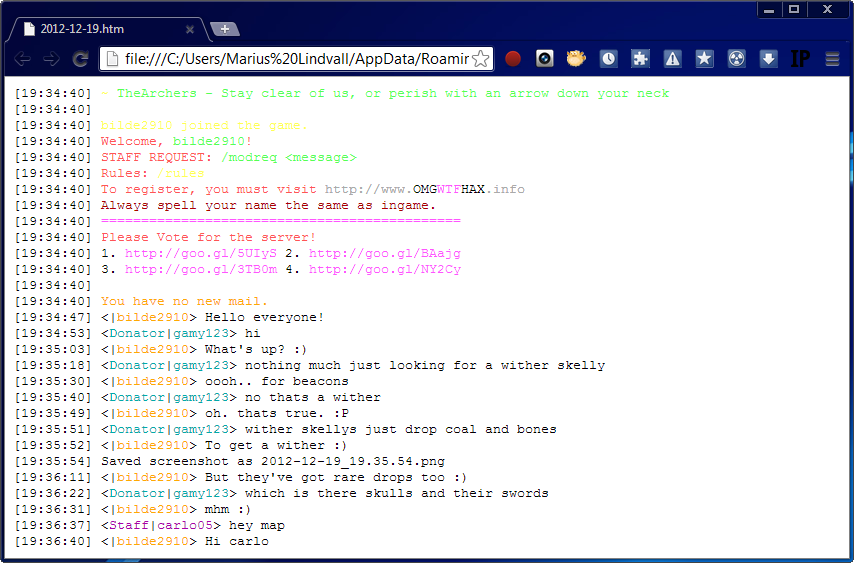
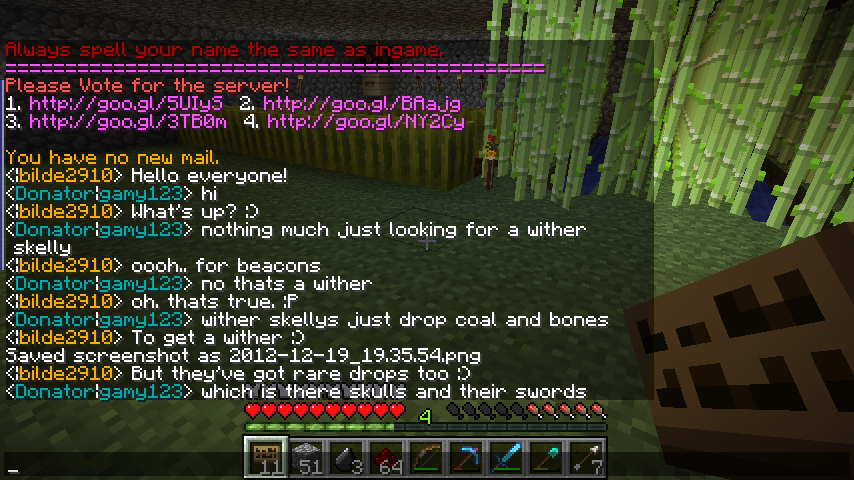
That has happened to me quite a few times. So I decided to make a mod that logs all chat to files on your computer. It's fast, and it happens automatically. No need to worry about taking screenshots all the time - just in case.
Features
- Saves all chat, automatically, to a folder called "chatlogs" in .minecraft
- Only one class file
- Saves colors!
- Several color themes to select from
- Doesn't send anything to the server, meaning it won't say anything in your place
- You won't even notice it's there
- Compatible with most other mods
- Does not require ModLoader or Forge
- All messages are timestamped
- Configuration file (.minecraft\config\ChatLog.properties)
Screenshots
Please see the screenshots page on my website or click the images tab above.
Videos
Installation and configuration
- Download the auto-installer from the downloads page.
- Launch the installer and follow the instructions on screen.
- Select how you'd like to install ChatLog, and press the relevant Install button.
- Let the installer finish downloading and installing.
- Close the launcher, and start Minecraft.
- For configuration, please see the configuration page on my website or the configuration page here on CurseForge.
Download the latest version directly from my website: Click here to download latest version!
Frequently Asked Questions
Please see the FAQ on my website or the ChatLog FAQ here on CurseForge.
- Edition: Minecraft Java
- File type: .jar
- How to install: Install the matching mod loader (Forge, Fabric or NeoForge) for your Minecraft version. → Download the .jar. → Put it in the .minecraft/mods folder and launch that loader profile.
- Where to get it: Opens on CurseForge — not every file is mirrored on our own servers.
Install steps are the general flow for this file type — How to install Minecraft Java mods & modpacks walks through it step by step.
ChatLog is a free Minecraft Java mod. Downloaded 9,300 times (via CurseForge). Download it and open it directly in the game.