Coolers
Minecraft Java mod. File opened and checked on 20 Oct 2026; downloads from the MC Java Mods app on Android.
⬇ Download on CurseForge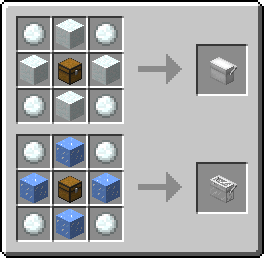
When you place the block in the world and activate (right click) it, you will be presented with a GUI similar to a chest's, but with six slots.
When you break the cooler it keeps its inventory, and while it is in your inventory and you are hungry, the cooler will feed you, first from it's buffer, then it's inventory.
If you look at the cooler's tooltip in your inventory, you may notice that it says whether its colored and/or transparent, and if you have food stored in it, it will even display the items in it and their quantities, as well as displaying the cooler's food buffer (keep in mind that 1 point in its buffer is one-half of a hunger icon).
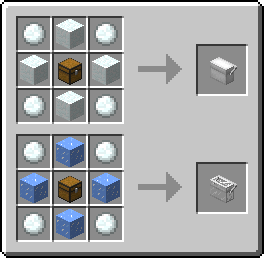
Crafting:

Curse based modpacks and spotlights are welcomed, no need to ask.
- Edition: Minecraft Java
- File type: .jar
- How to install: Install the matching mod loader (Forge, Fabric or NeoForge) for your Minecraft version. → Download the .jar. → Put it in the .minecraft/mods folder and launch that loader profile.
- Where to get it: Opens on CurseForge — not every file is mirrored on our own servers.
Install steps are the general flow for this file type — How to install Minecraft Java mods & modpacks walks through it step by step.
Coolers is a free Minecraft Java mod. Downloaded 83,566 times (via CurseForge). Download it and open it directly in the game.