
QoL Toolkit
A lightweight, client-side quality-of-life mod for Minecraft 26.2 — no server required.
QoL Toolkit bundles the small-but-essential features that vanilla Minecraft is missing into a single, zero-dependency mod. Everything is toggleable, nothing is forced on you, and it works on any server you join.
Features
🗺️ Info HUD
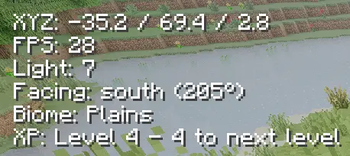
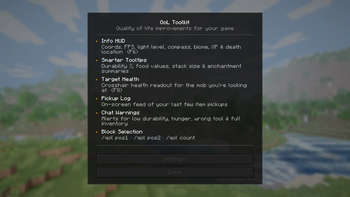
A clean heads-up display showing your coordinates, FPS, light level, compass bearing, current biome, XP level, armor durability, and your last death location — all in one place. Toggle with F6.
📋 Smarter Tooltips
Hover over any item to see extra detail: durability as a percentage, food hunger and saturation values, stack size, and a compact enchantment summary (e.g. Sharp V · Unbr III · Loot II) so you can read your gear at a glance.
❤️ Target Health Display
See the health of whatever mob your crosshair is resting on, shown directly on your HUD. Toggle with F8.
📦 Pickup Log
A small on-screen feed that shows the last few items you've picked up — useful when farming or looting chests quickly.
⚠️ Chat Warnings
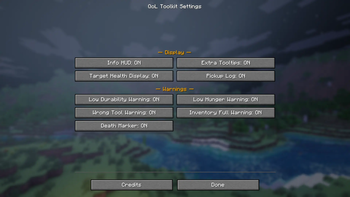
Automatic alerts so nothing sneaks up on you:
- Low durability — warns before your tools break
- Low hunger — reminds you to eat
- Wrong tool — nudges you when you're mining with the wrong item
- Inventory full — lets you know before you start losing drops
📐 Block Selection Tool
Mark two corners with /qol pos1 and /qol pos2, then use /qol count to get a full block-type breakdown of the selected volume. Great for building planning and survival inventory prep.
Commands
| Command | Description |
|---|---|
/qol |
Open the main menu |
/qol settings |
Open the settings screen |
/qol toggle <feature> |
Toggle any feature without opening the menu |
/qol pos1 / /qol pos2 |
Set selection corners to the block you're looking at |
/qol count |
Count block types in your selection |
/qol selection |
Show current selection corners |
/qol clearselection |
Clear the selection |
Keybindings
| Key | Action |
|---|---|
| F6 | Toggle Info HUD |
| F8 | Toggle Target Health Display |
| F9 | Open QoL Toolkit menu |
Requirements
- Minecraft 26.2
- Fabric Loader 0.19.3+
- Fabric API 0.152.2+26.2
Notes
- Client-side only — works on any multiplayer server, no mod needed server-side
- All settings persist between sessions
- Made by James Berry · Licensed under CC0-1.0
- Edition: Minecraft Java
- File type: .jar
- Minecraft version listed: 26.2
- How to install: Install the matching mod loader (Forge, Fabric or NeoForge) for your Minecraft version. → Download the .jar. → Put it in the .minecraft/mods folder and launch that loader profile.
- Where to get it: Opens on Modrinth — not every file is mirrored on our own servers.
Install steps are the general flow for this file type — How to install Minecraft Java mods & modpacks walks through it step by step.
- Ships as qol-toolkit-1.1.0.jar — drop this file into the mods folder
- Download size: 77 KB
- Download link checked 14 Sept 2026 — working
These come from our own check of the pack file, not from the source page.