
GrimStats Client
A clientside companion for GrimStats servers. It brings the server's leaderboards into your game, right where the vanilla statistics already live.
Features
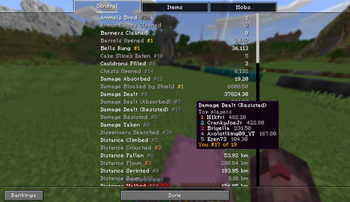
- Rank badges on the statistics screen. Your server-wide rank sits next to each stat, with gold, silver, and bronze for the podium.
- Leaderboard tooltips. Hover any stat on the General, Items, or Mobs tab to see the top players and where you place.
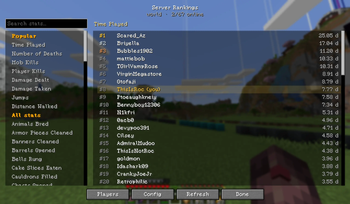
- Server Rankings screen. Browse a live leaderboard for any stat, with search across every stat type including modded ones.
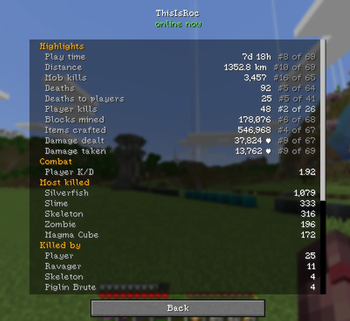
- Players and profiles. A sortable roster and per-player pages with combat stats, K/D, most killed mobs, top blocks mined, and a distance breakdown.
- In-game config. Set it up from a settings screen, ModMenu, or a keybind. No file editing.
Setup
Install the mod and join a server running GrimStats. It finds the API automatically from the
server address. If the dashboard runs elsewhere, set the URL with /grimstatsc url <address> or
in the config screen. Private servers may need an API token, which goes in the same place.
Requires
- Fabric Loader and Fabric API
- ModMenu is optional, for the config button
Clientside only. Safe to use on any server; it stays completely quiet when no GrimStats server is present.
Quick facts
- Edition: Minecraft Java
- File type: .jar
- Minecraft version listed: 1.21.11
- How to install: Install the matching mod loader (Forge, Fabric or NeoForge) for your Minecraft version. → Download the .jar. → Put it in the .minecraft/mods folder and launch that loader profile.
- Where to get it: Opens on Modrinth — not every file is mirrored on our own servers.
Install steps are the general flow for this file type — How to install Minecraft Java mods & modpacks walks through it step by step.
Verified by MCModsHub
- Ships as grimstats-client-0.2.1.jar — drop this file into the mods folder
- Download size: 103 KB
- Download link checked 14 Sept 2026 — working
These come from our own check of the pack file, not from the source page.