
GrimStats
A web dashboard and JSON API for your Fabric server's statistics.
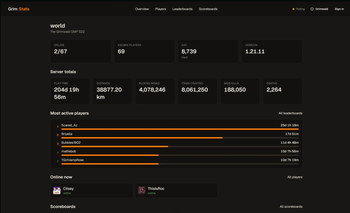
GrimStats collects every statistic the game tracks and serves it from a clean, self-contained web dashboard bundled right inside the mod. Vanilla stats, scoreboards, and anything added by other mods or datapacks all show up automatically.
Features
- Every stat, automatically - vanilla, scoreboard objectives, and modded/datapack stats, with no configuration.
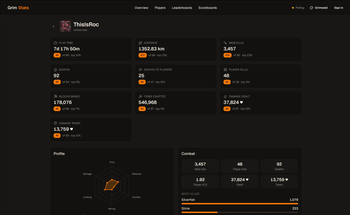
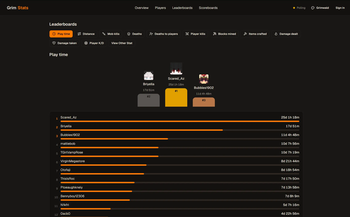
- Interactive dashboard - leaderboards with podiums, per-player profiles with charts, pinned stats on the homepage, live updates, and a theme picker.
- Seasons - archive a world's full stats as a portable file before a reset, and browse past seasons forever. Import archives from other servers too.
- Shareable links - player and leaderboard embeds on Discord with live stat summaries and preview images.
- Admin tools - multiple accounts with roles, API keys, and per-stat visibility controls, all from the dashboard.
- Lightweight - an async snapshot cache means web requests never touch game state, so it stays easy on the server.
Requirements
- Minecraft 1.21.11 (Fabric)
- Fabric API
- Java 21+
Usage
- Drop the jar into your server's
mods/folder (alongside Fabric API) and start the server. - The dashboard is live at
http://<your-server-ip>:8765. - Create an admin account in-game as an operator:
(/grimstats setup <username> <password>/grimstats infoprints the dashboard URL.) - Open the dashboard, browse your stats, and sign in at Admin to manage settings.
Everything is configurable live from the dashboard or in config/grimstats.json.
Client not required - this is a server-side mod. Players don't need to install anything.
Links
Quick facts
- Edition: Minecraft Java
- File type: .jar
- Minecraft version listed: 1.21.11
- How to install: Install the matching mod loader (Forge, Fabric or NeoForge) for your Minecraft version. → Download the .jar. → Put it in the .minecraft/mods folder and launch that loader profile.
- Where to get it: Opens on Modrinth — not every file is mirrored on our own servers.
Install steps are the general flow for this file type — How to install Minecraft Java mods & modpacks walks through it step by step.
Verified by MCModsHub
- Ships as grimstats-0.6.2.jar — drop this file into the mods folder
- Download size: 384 KB
- Download link checked 14 Sept 2026 — working
These come from our own check of the pack file, not from the source page.