
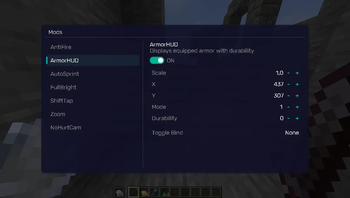
REQUIREMENTS NightVisuals GUI
EN:
NightVisuals ArmorHud is a lightweight HUD modification that displays your currently equipped armor pieces and held items, along with their durability, directly on the screen for real-time equipment tracking during combat.
Core Features
- Real-Time Durability Tracking: Displays icons and exact durability values for helmet, chestplate, leggings, boots, and held items.
- Toggle On/Off: Easily enable or disable the HUD overlay through the NightVisuals in-game GUI menu.
- Clean & Compact UI: Designed to fit seamlessly into the vanilla interface without cluttering important screen space.
- Zero Performance Impact: Renders utilizing lightweight 2D texture batching, ensuring absolutely no impact on your FPS.
Configuration
ArmorHud toggles via the NightVisuals GUI (default key: RShift). No separate config files required.
Installation
- Install Fabric Loader and Fabric API.
- Install NightVisuals GUI (required dependency).
- Place the downloaded ArmorHud mod
.jarfile into yourmodsfolder. - Launch the game.
RU:
NightVisuals ArmorHud — это легковесная модификация игрового интерфейса, которая выводит надетую броню, предметы в руках и их прочность прямо на экран, позволяя следить за состоянием экипировки в реальном времени прямо во время боя.
Основной функционал
- Отслеживание прочности: Отображает иконки и точные значения прочности для шлема, нагрудника, поножей, ботинок, а также предметов в главной и левой руке.
- Включение/Выключение: Удобное управление отображением интерфейса через внутриигровое меню NightVisuals GUI.
- Чистый и компактный UI: Элементы аккуратно вписываются в ванильный интерфейс, не перекрывая важные зоны обзора.
- Нулевое влияние на FPS: Рендеринг использует легковесный двухмерный вывод текстур, что гарантирует полное отсутствие просадок производительности.
Настройка
ArmorHud переключается через NightVisuals GUI (клавиша по умолчанию: RShift). Дополнительных конфигов нет.
Установка
- Установите Fabric Loader и Fabric API.
- Установите NightVisuals GUI (обязательная зависимость).
- Поместите скачанный файл мода ArmorHud в папку
mods. - Запустите игру.
- Edition: Minecraft Java
- File type: .jar
- Minecraft version listed: 1.21.4
- How to install: Install the matching mod loader (Forge, Fabric or NeoForge) for your Minecraft version. → Download the .jar. → Put it in the .minecraft/mods folder and launch that loader profile.
- Where to get it: Opens on Modrinth — not every file is mirrored on our own servers.
Install steps are the general flow for this file type — How to install Minecraft Java mods & modpacks walks through it step by step.
- Ships as nightvisuals-ArmorHUD-1.0.jar — drop this file into the mods folder
- Download size: 7 KB
- Download link checked 14 Sept 2026 — working
These come from our own check of the pack file, not from the source page.