
ModsJava
Chat Hider
Java mod listed for Minecraft 1.21–26.x. Downloads from the MC Java Mods app on Android.
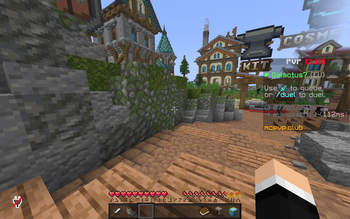
This is a Minecraft Mod that allows you to Hide and Show the chat at will by typing /chathider in the chat to toggle it.
⬇ Download on Modrinth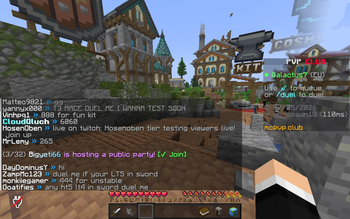
Chat Hider
Hide or show your Minecraft chat whenever you want with a simple command.
Features
- Toggle chat visibility on and off instantly.
- Uses the
/chathidercommand to switch between hidden and visible chat. - Lightweight and simple—no unnecessary configuration.
Usage
Type the following command in chat:
/chathider
Running the command will toggle the chat between hidden and visible.
Why use Chat Hider?
Chat Hider is useful if you want to:
- Take clean screenshots without chat.
- Reduce distractions while playing.
- Quickly hide chat during gameplay or streaming.
- Toggle chat without changing Minecraft settings.
Compatibility
- Client-side mod.
- Does not require installation on servers.
- Safe to use on multiplayer servers unless the server specifically restricts client-side mods.
Quick facts
- Edition: Minecraft Java
- File type: .jar
- Minecraft versions listed: 1.21.11, 26.1, 26.1.1
- How to install: Install the matching mod loader (Forge, Fabric or NeoForge) for your Minecraft version. → Download the .jar. → Put it in the .minecraft/mods folder and launch that loader profile.
- Where to get it: Opens on Modrinth — not every file is mirrored on our own servers.
Install steps are the general flow for this file type — How to install Minecraft Java mods & modpacks walks through it step by step.
File checked by MCModsHub
- Ships as ChatHider.jar — drop this file into the mods folder
- Download size: 1.4 MB
- Download link checked 25 Oct 2026 — working
These come from our own check of the pack file, not from the source page.