
Grounds Connect
Java mod listed for Minecraft 26.x. Downloads from the MC Java Mods app on Android.
In-game developer tools for Grounds projects: browse servers, monitor deploys, stream logs, and connect from Minecraft.
⬇ Download on Modrinth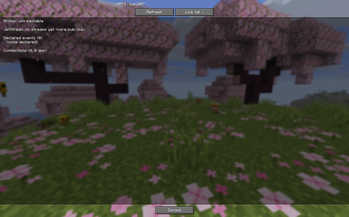
Grounds Connect
Grounds Connect is a Fabric client mod for developers and teams using the Grounds developer platform. It brings your Grounds projects directly into Minecraft, so you can sign in, browse project servers, inspect deployment state, follow logs, and join test environments without switching between Minecraft and external dashboards. This is not a gameplay content mod: it does not add blocks, items, mobs, or dimensions. It is a developer and operator tool for working with Grounds-powered Minecraft servers.
Features
- Grounds login from Minecraft with a secure browser-based device code flow.
- Project server browser for viewing Minecraft servers in your Grounds projects.
- One-click server joining, including wake-on-join for paused servers.
- Live server health, ping, latency, and player counts.
- Velocity proxy grouping for backend Paper, gamemode, and Minestom servers.
- Build and deploy notifications as in-game toast updates.
- In-game runtime and build log console with copy and mclo.gs sharing.
- NATS inspection tools for broker status, subjects, streams, connections, and message tails.
- Developer actions such as retrying failed builds and rolling back deployments when permitted.
- Favorites and search for larger project server lists.
Data Collection & Telemetry
Grounds Connect connects your client to the Grounds platform (grounds.gg). When you use it, the following data is sent to Grounds-operated servers:
- Your Minecraft account identity (UUID/username) and an authentication token, to sign you in.
- Session/connection metadata (which Grounds servers you join).
- In-game match results and gameplay events, used for matchmaking and stats.
- Diagnostic and error telemetry (crash and error reports), used to keep the mod stable.
This data is used to operate the service (auth, server discovery, matchmaking, analytics) and is not sold. It is processed on Grounds infrastructure and, for diagnostics, by Sentry as our processor in its EU region; both are bound by data processing agreements and act only on our behalf. It is not shared with third parties for their own purposes.
For details on what we collect, why, retention, and your rights, see our privacy policy: Grounds Privacy.
Why use it?
Grounds Connect keeps common development workflows inside the game: find the right project, check whether servers are healthy, inspect logs, follow deployments, and connect to test environments quickly. Regular players usually only need this mod if they are part of a Grounds-based testing or development workflow.
- Edition: Minecraft Java
- File type: .jar
- Minecraft version listed: 26.2
- How to install: Install the matching mod loader (Forge, Fabric or NeoForge) for your Minecraft version. → Download the .jar. → Put it in the .minecraft/mods folder and launch that loader profile.
- Where to get it: Opens on Modrinth — not every file is mirrored on our own servers.
Install steps are the general flow for this file type — How to install Minecraft Java mods & modpacks walks through it step by step.
- Ships as grounds-connect-0.5.1.jar — drop this file into the mods folder
- Download size: 2.0 MB
- Download link checked 24 Oct 2026 — working
These come from our own check of the pack file, not from the source page.