ModsJava
Chunk Backup
Java mod listed for Minecraft 1.20. Downloads from the MC Java Mods app on Android.
⬇ Download on Modrinth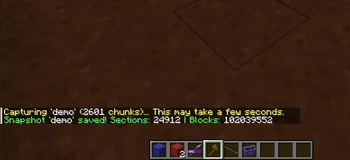
Chunk Back
A Minecraft Forge 1.20.1 mod for saving and restoring chunk regions without lagging the server.
What it adds
Chunk Back lets server operators save snapshots of chunk regions and restore them later without causing lag spikes or consuming RAM during normal gameplay. It uses RLE voxel compression to store snapshots on disk.
Commands
All commands require operator permission level 2.
| Command | Description |
|---|---|
/chunkback save <name> [radius] |
Save chunks around you (default radius: 4) |
/chunkback savearea <name> <x1> <z1> <x2> <z2> |
Save a specific chunk range |
/chunkback restore <name> |
Restore snapshot to saved state |
/chunkback list |
Show all saved snapshots |
/chunkback delete <name> |
Remove a snapshot |
/chunkback info <name> |
Show snapshot details |
Important Notes
- Snapshots are stored per-world in the server's config directory
- Restoring a snapshot overwrites existing blocks in the region
- Large restores may take several ticks to complete; the server remains playable throughout
Quick facts
- Edition: Minecraft Java
- File type: .jar
- Minecraft version listed: 1.20.1
- How to install: Install the matching mod loader (Forge, Fabric or NeoForge) for your Minecraft version. → Download the .jar. → Put it in the .minecraft/mods folder and launch that loader profile.
- Where to get it: Opens on Modrinth — not every file is mirrored on our own servers.
Install steps are the general flow for this file type — How to install Minecraft Java mods & modpacks walks through it step by step.
File checked by MCModsHub
- Ships as chunkback-1.0.0.jar — drop this file into the mods folder
- Download size: 32 KB
- Download link checked 25 Oct 2026 — working
These come from our own check of the pack file, not from the source page.