
TradeWatch
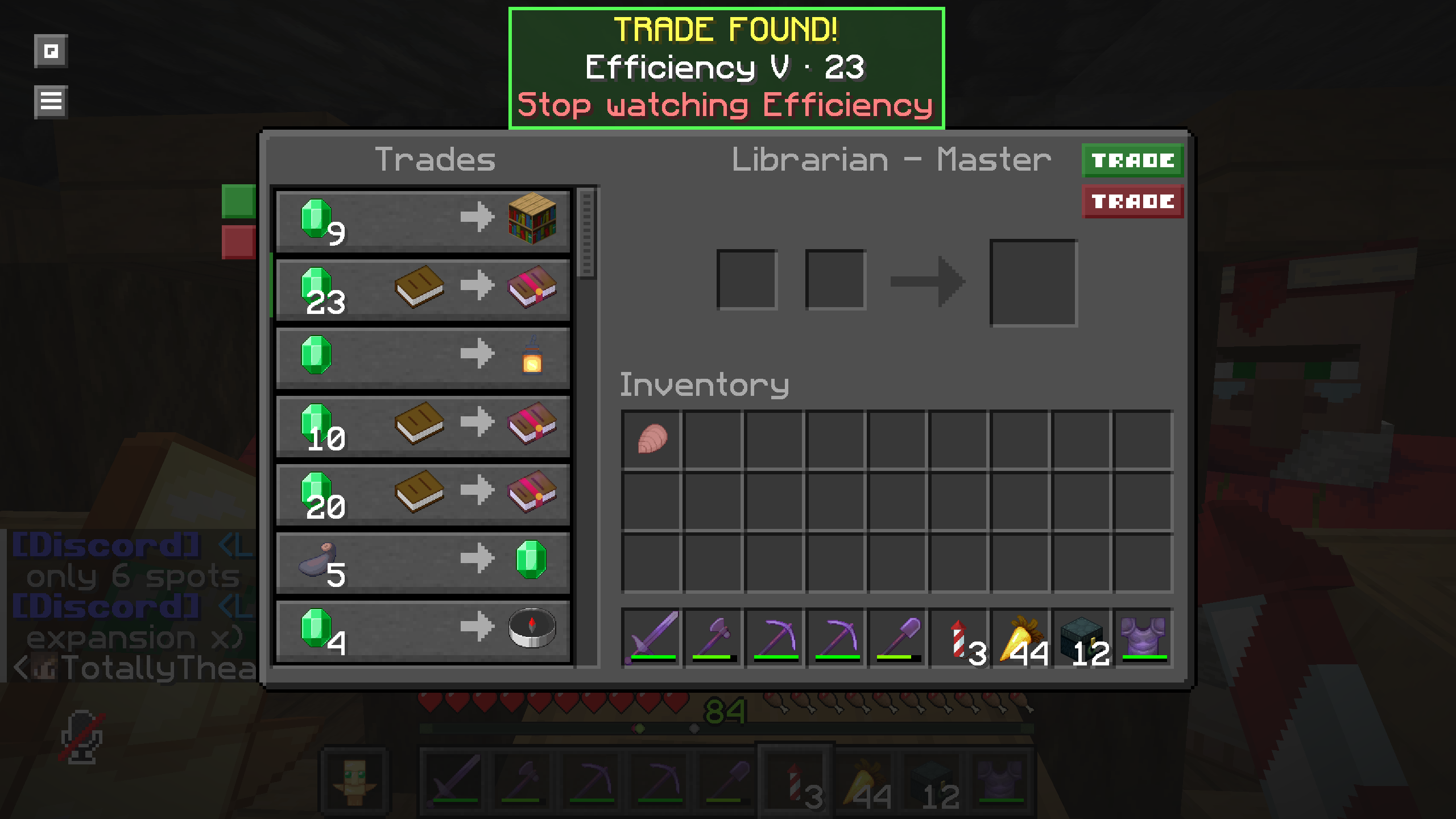
TradeWatch finds matching enchanted-book villager trades, highlights them, and plays a notification sound. Set desired enchantments, levels, and maximum…
I don't know my version or loader
TradeWatch
TradeWatch is a client-side Fabric mod that finds librarian enchanted-book trades you actually want. It never rerolls, clicks trades, interacts with blocks, breaks lecterns, or automates villagers.
Requirements
Fabric Loader and Fabric API are required. Mod Menu is optional.
Using TradeWatch
Open the configuration screen with the default G key (rebindable in Minecraft Controls), /tradewatch, or Mod Menu's Configure button. Search by enchantment name (eff, mend) or registry ID (minecraft:efficiency), select an enchantment, enable its individual levels, and set each level's independent maximum price with a 1–64 emerald slider.
Only enchanted-book offers in the villager merchant screen are checked; other results are ignored. TradeWatch uses the actual current emerald stack shown by the offer, including discounts, and ignores the required Book input. Matching rows are green, a vanilla ping is played once per opened merchant screen, and a non-blocking center-screen panel provides! Stop watching actions. Stopping removes all watched levels for that enchantment.
Wishlist entries use Minecraft registry identifiers and independent prices per level. For example, Efficiency IV can be watched for 15 emeralds while Efficiency V is watched for 32. Invalid or unavailable registry entries are safely removed after registry synchronization.
Commands
/tradewatch
/tradewatch add minecraft:efficiency 5 price:32
/tradewatch remove minecraft:efficiency
/tradewatch remove minecraft:efficiency 5
/tradewatch list
/tradewatch clear
/tradewatch clear confirm
add validates the runtime registry identifier, supported level, and 1–64 price. The exact price:32 syntax is required. remove <enchantment> removes every watched level for that enchantment; remove <enchantment> <level> only removes that level. clear requires the explicit confirm literal. Prices are configured per enchantment level, not globally.
- Edition: Minecraft Java
- File type: .jar
- Minecraft versions listed: 26.1, 26.1.1, 26.1.2
- How to install: Install the matching mod loader (Forge, Fabric or NeoForge) for your Minecraft version. → Download the .jar. → Put it in the .minecraft/mods folder and launch that loader profile.
- Where to get it: Opens on Modrinth — not every file is mirrored on our own servers.
Install steps are the general flow for this file type — How to install Minecraft Java mods & modpacks walks through it step by step.
- Ships as tradewatch-26.1.x.jar — drop this file into the mods folder
- Download size: 1.1 MB
- Download link checked 24 Aug 2026 — working
These come from our own check of the pack file, not from the source page.