
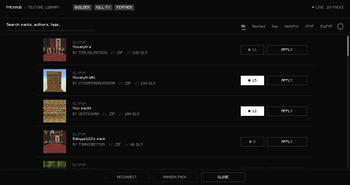
PackHub is a Fabric client-side mod that:
Opens an in‑game hub so you don’t browse the web to find texture packs — open it from the title menu, pause menu, or a configurable keybinding. Lists community packs with search, filters, previews, starred favourites, download progress, multi-downloads, optional download verification. Applies packs the normal Minecraft way — after download they show up alongside your other texture packs so you enable and order them yourself. Pack Builder: pick vanilla items/blocks/particles, map texture names for the builder/export flow, peek your inventory while mapping, bundle a pack skeleton. Pack Editor: change the shown pack title, tweak per-texture “replaces vanilla id” overrides, reload lists per category. Feather tooling: browse local Feather profiles and import/export community Feather-style profiles when the backend supports them. Cosmetic Kill FX: simple full-screen flashes tied to configurable effects, or disable entirely. Server connection uses auto-discovery plus an override in Settings when you need full control.
- Edition: Minecraft Java
- File type: .jar
- Minecraft version listed: 1.20.2
- How to install: Install the matching mod loader (Forge, Fabric or NeoForge) for your Minecraft version. → Download the .jar. → Put it in the .minecraft/mods folder and launch that loader profile.
- Where to get it: Opens on Modrinth — not every file is mirrored on our own servers.
Install steps are the general flow for this file type — How to install Minecraft Java mods & modpacks walks through it step by step.
- Ships as packhub-sync-1.20.2-fabric-1.0.0.jar — drop this file into the mods folder
- Download size: 13 KB
- Download link checked 13 Sept 2026 — working
These come from our own check of the pack file, not from the source page.