
ModsJava
Inventorio Extra
Java mod listed for Minecraft 1.21. Downloads from the MC Java Mods app on Android.
A companion mod for Inventorio that adds inventory sorting, configurable tool/block replacement whitelists with in-game GUI editors, customizable…
I don't know my version or loader
Open the Minecraft launcher and look at the profile you play on — it names both, like fabric-loader-1.21.4. The version also shows in the bottom-right corner of the game's main menu.
No loader in the profile name? Then it's plain Minecraft, and these mods won't run — you need Fabric or NeoForge installed first.
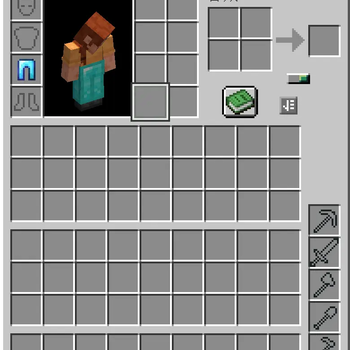
Inventorio Extra is an add-on mod for Inventorio, designed to be used alongside it.
- Auto-feeding item disappearance fix — Fixes item loss caused by SophisticatedBackpacks' feeding upgrade conflicting with Inventorio
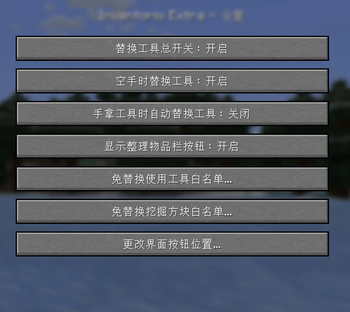
- Tool replacement whitelist — Configurable item whitelist (supports exact IDs, tags, and mod wildcards); whitelisted items won't be auto-swapped
- Block mining whitelist — Prevents tool replacement when mining specific blocks
- Tool replacement fine control — Master switch, replace when empty-handed, replace when holding a tool, and more
- Inventory sorting — Press R or click the button in the Inventorio screen to sort; categorized into 19 item types, sorted by quality within each type
- Button repositioning — Drag-and-drop interface to freely reposition the tool belt toggle button and sort button
Chinese: Inventorio Extra 是 Inventorio 的附属模组,与 Inventorio 搭配使用。
- 自动喂食物品消失修复 — 修复 SophisticatedBackpacks 喂食升级与 Inventorio 冲突导致物品丢失的问题
- 工具替换白名单 — 可配置的物品白名单(支持精确ID、标签、模组通配符),白名单内物品不会被自动换掉
- 方块挖掘白名单 — 挖掘特定方块时不触发自动换工具
- 工具替换精细控制 — 总开关、空手时替换、手持工具时替换等选项
- 物品栏排序 — 在 Inventorio 界面按 R 或点按钮排序,按19种物品类型分类,同类型内按品质排序
- 按钮位置调整 — 拖拽式界面,自由调整工具袋切换按钮和排序按钮的位置
Quick facts
- Edition: Minecraft Java
- File type: .jar
- Minecraft versions listed: 1.21, 1.21.1
- How to install: Install the matching mod loader (Forge, Fabric or NeoForge) for your Minecraft version. → Download the .jar. → Put it in the .minecraft/mods folder and launch that loader profile.
- Where to get it: Opens on Modrinth — not every file is mirrored on our own servers.
Install steps are the general flow for this file type — How to install Minecraft Java mods & modpacks walks through it step by step.
File checked by MCModsHub
- Ships as InventorioExtra-1.4.0.jar — drop this file into the mods folder
- Download size: 104 KB
- Download link checked 25 Oct 2026 — working
These come from our own check of the pack file, not from the source page.