
Sound GUI
Java mod listed for Minecraft 1.20. Downloads from the MC Java Mods app on Android.
Get full control over your Minecraft audio. An intuitive, modern interface for managing detailed audio sources and advanced filtering of annoying sounds.
⬇ Download on Modrinth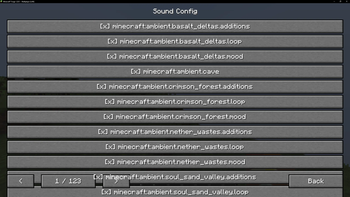
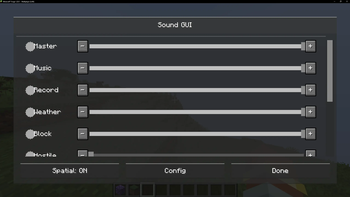
Sound GUI is a client-side modification for Minecraft (Forge 1.20.1) that introduces an advanced sound control panel. The mod allows for precise volume control of individual sound sources and the blocking of unwanted sound effects using a built-in filter.
Key Features Extended Sound Mixer: The panel allows for independent volume adjustments for each sound source type (SoundSource), extending beyond the game's standard settings.
Sound List Management: The mod includes a customizable interface that allows for the selective muting of specific sound identifiers (ResourceLocation) in the game.
GUI Integration: The menu is accessed directly via a modified "Music and Sounds" button in the game settings menu.
Storage System: All volume changes and filter settings are saved in configuration files (.properties) in the config folder, ensuring that settings persist after restarting the application.
Performance: The modification runs client-side and has been optimized to work in large modpacks without negatively impacting FPS stability.
- Edition: Minecraft Java
- File type: .jar
- Minecraft version listed: 1.20.1
- How to install: Install the matching mod loader (Forge, Fabric or NeoForge) for your Minecraft version. → Download the .jar. → Put it in the .minecraft/mods folder and launch that loader profile.
- Where to get it: Opens on Modrinth — not every file is mirrored on our own servers.
Install steps are the general flow for this file type — How to install Minecraft Java mods & modpacks walks through it step by step.
- Ships as Sound_GUI-1.0.0.jar — drop this file into the mods folder
- Download size: 25 KB
- Download link checked 25 Oct 2026 — working
These come from our own check of the pack file, not from the source page.