
Custom Playlist
Java mod listed for Minecraft 1.21. Downloads from the MC Java Mods app on Android.
Custom Playlist is a Fabric mod for Minecraft that lets you listen to PVP music while playing — with a clean, minimal black UI that stays out of your way.
⬇ Download on Modrinth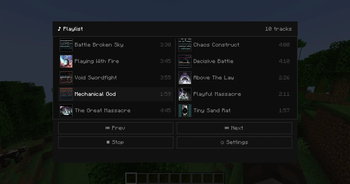
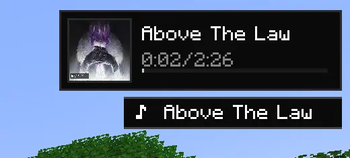
Features: In-game music player — a compact HUD player in the top-right corner showing the current song, cover art, and a progress bar. Fades out after 10 seconds and comes back when the song changes. Toggle it on/off with K. Playlist screen — open with J to see all tracks with cover art, a pulsing dot on the currently playing song, and playback controls. Includes a progress bar at the bottom. Combat music — music automatically starts after landing a set number of hits on another player in PvP. Fully configurable: number of hits required, reset timer, and whether combat music is enabled at all. Settings screen — control volume, hit count, reset timer, combat music toggle, and display mode (mini player, toast notification, or both). Keybinds (all rebindable in Controls):
J — open playlist N — next song V — previous song B — play / stop K — toggle HUD visibility
Songs included: Battle Broken Sky, Chaos Construct, Playing With Fire, Decisive Battle, Void Swordfight, Above The Law, Mechanical God, Playful Massacre, The Great Massacre, Tiny Sand Rat — all by AZALI.
- Edition: Minecraft Java
- File type: .jar
- Minecraft version listed: 1.21.8
- How to install: Install the matching mod loader (Forge, Fabric or NeoForge) for your Minecraft version. → Download the .jar. → Put it in the .minecraft/mods folder and launch that loader profile.
- Where to get it: Opens on Modrinth — not every file is mirrored on our own servers.
Install steps are the general flow for this file type — How to install Minecraft Java mods & modpacks walks through it step by step.
- Ships as custom-playlist-1.0.0.jar — drop this file into the mods folder
- Download size: 25.7 MB
- Download link checked 25 Oct 2026 — working
These come from our own check of the pack file, not from the source page.