
Toolsmanship
Java mod listed for Minecraft 1.21. Downloads from the MC Java Mods app on Android.
Your smithing table, weapons, and armor have evolved! Make new tools and weapons with new ores with Toolsmanship.
I don't know my version or loader
This Java Mod is currently in beta.
This mod has several features that need to be implemented before it's production-ready, so it'll be in beta for now. v1.0.0's stable version will be released in late 2026. This mod will only work in Creative Mode or through commands in Survival Mode to start. In v1.0.0b2, full support for Survival Mode and new features will be added. Stay tuned!
Your smithing table, weapons, and armor, evolved!
Meet Toolsmanship, a brand-new Java mod for 1.21.1-1.21.8 (NeoForge), 1.20.1 (Forge), and 1.21.8-1.21.11 (Fabric) from the mind behind StoryModel, where your smithing table gets the upgrade it deserves! Make Emerald tools, Diamond tools quicker, and even tools using new ores such as Enderainium and maybe even an ore from another dimension not currently in Minecraft: Java Edition...
How do I use this mod?
It's simple!
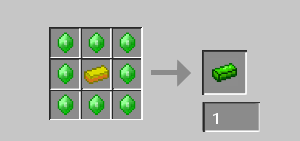
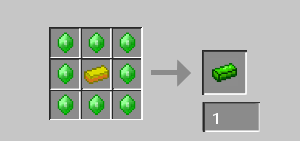
To start, take a gold ingot or two and wrap it in emeralds in a crafting table. Then, voilà! You now have an Emerald Ingot!
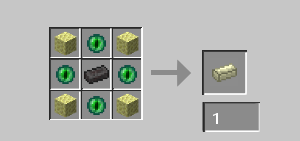
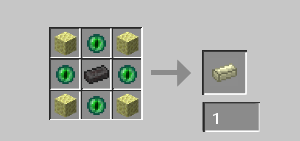
You can also do the same with End Stone and Eyes of Ender in the following recipe to make an Enderainium Ingot.
Then, obtain an Emerald, Diamond, or Enderainium Upgrade Template either through using the /give command or opening the Creative Menu.
In v1.0.0b1, they can only be obtained in Creative Mode or through commands; in later versions, support for Survival Mode will be added.
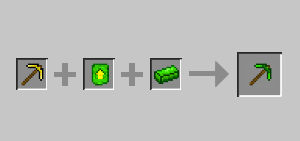
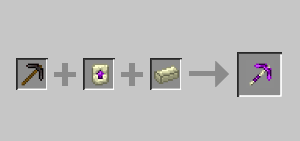
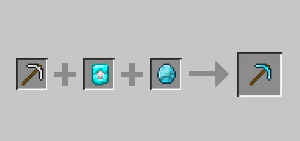
Then, follow the recipes below based on your Template.
Diamond:
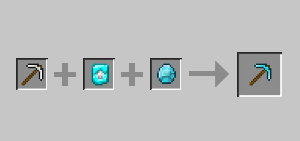
Emerald:
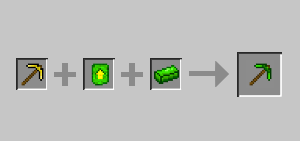
Enderainium:
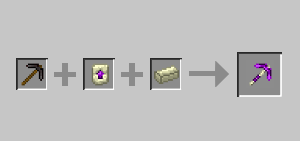
And that's it! Only Pickaxes are supported in v1.0.0b1. More weapons, tools, and things will be added in the future!
About this project and its owner
This is a passion project I'm working on to raise money to buy an Xbox 360 S and to fund an indie animation project, so any engagement helps! If you feel like supporting an 18-year-old guy with autism with his hopes and dreams, feel free to share this around, as I get ad revenue and do not have a Ko-fi or a payment method. Thank you!
- Edition: Minecraft Java
- File type: .jar
- Minecraft versions listed: 1.21.8, 1.21.9, 1.21.10
- How to install: Install the matching mod loader (Forge, Fabric or NeoForge) for your Minecraft version. → Download the .jar. → Put it in the .minecraft/mods folder and launch that loader profile.
- Where to get it: Opens on Modrinth — not every file is mirrored on our own servers.
Install steps are the general flow for this file type — How to install Minecraft Java mods & modpacks walks through it step by step.
- Ships as toolsmanship-1.0.0b1-fabric-1.21.8.jar — drop this file into the mods folder
- Download size: 60 KB
- Download link checked 26 Oct 2026 — working
These come from our own check of the pack file, not from the source page.