
🏗️ Scrabble: Seamless Random Building
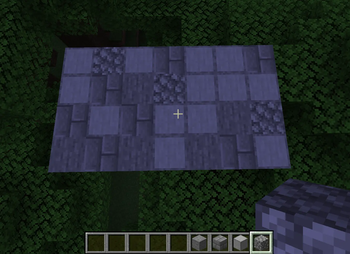
Are you tired of manually scrolling through your hotbar while building textured walls, paths, or natural landscapes? Scrabble takes the tedium out of random building by automatically swapping your blocks for you!
✨ Features
- Auto-Swapping: Every time you place a block, Scrabble instantly switches your hotbar to another active slot.
- In-Game GUI (
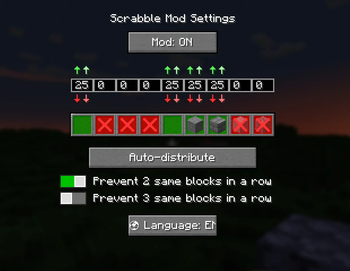
Oby default): Configure your randomizer visually without leaving the game. - Precise Control: Click to enable or disable specific slots in your hotbar. Use the
↑and↓arrows to set exact percentage chances for each block. - Auto-Distribute: Press one button to instantly balance the percentages across all your active slots (totaling 100%).
- Smart Anti-Clump: Enable built-in protections to prevent placing 2 or 3 of the same blocks in a row. Keep your textures looking smooth!
- Quick Toggle: Turn the mod ON or OFF on the fly via a dedicated keybind or the GUI button.
- Bilingual Support: Fully translated into English and Russian (toggleable in-game).
Quick facts
- Edition: Minecraft Java
- File type: .jar
- Minecraft version listed: 1.21.11
- How to install: Install the matching mod loader (Forge, Fabric or NeoForge) for your Minecraft version. → Download the .jar. → Put it in the .minecraft/mods folder and launch that loader profile.
- Where to get it: Opens on Modrinth — not every file is mirrored on our own servers.
Install steps are the general flow for this file type — How to install Minecraft Java mods & modpacks walks through it step by step.
Verified by MCModsHub
- Ships as scrabble-1.21.11.jar — drop this file into the mods folder
- Download size: 22 KB
- Download link checked 25 Aug 2026 — working
These come from our own check of the pack file, not from the source page.