
Living Blocks
Java mod listed for Minecraft 1.21. Downloads from the MC Java Mods app on Android.
⬇ Download on Modrinth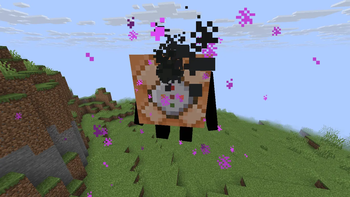
Epitex — Living Blocks
What if Minecraft blocks… fought back?
Living Blocks turns ordinary blocks into tiny living creatures with unique abilities, personalities, and absolutely zero survival instincts.
Craft them.
Spawn them.
Command them.
Regret everything.
Build an army of living blocks and see how long your world survives.
✨ Features
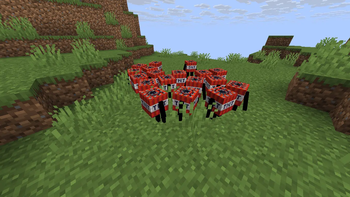
• Boomling — a tiny living TNT that explodes… and may create more Boomlings → Spawn by igniting a TNT block → Make Laser (to command them) by placing an iron ingot and a echo shard in a crafting table
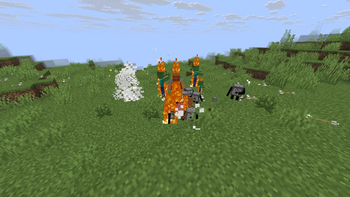
• Shootling — living combat support that consumes ammo and attacks nearby enemies → Spawn by putting 5 different projectile types into a dispenser
• Lootling — chests with feet that steal your loot → Spawn by opening chests (small random chance)
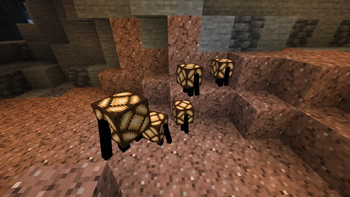
• Lampling — moving light companions powered by redstone → Spawn by activating a lamp
• Godling — an endgame block that bends terrain and rewrites reality → Spawn using a Godling Spawn Egg (creative / commands only)
⚠️ Important Note
Living Blocks is designed around experimentation and controlled chaos.
Some blocks may modify terrain, trigger chain reactions, or become unexpectedly powerful.
Backup worlds are highly recommended.
Especially before summoning Godling.
📋 How It Works
• Interact with normal Minecraft blocks to awaken them
• Every Living Block has a unique activation method
• Feed certain blocks resources to unlock behaviors
• Some Living Blocks evolve or multiply
• Each block has different AI and abilities
• Discover hidden interactions and combinations
• Progress toward the final Living Block encounter
🛠 Compatibility
• Minecraft 1.21.10
• Fabric
• No extra dependencies
• Singleplayer
Installation
Download the latest .jar
Drop it into your mods folder
Launch Minecraft
Create life
Accept consequences
Perfect for:
• Minecraft challenge videos
• Chaos enjoyers
• Mod showcases
• Survival players
• Content creators
• People who think blocks should have feet
- Edition: Minecraft Java
- File type: .jar
- Minecraft version listed: 1.21.10
- How to install: Install the matching mod loader (Forge, Fabric or NeoForge) for your Minecraft version. → Download the .jar. → Put it in the .minecraft/mods folder and launch that loader profile.
- Where to get it: Opens on Modrinth — not every file is mirrored on our own servers.
Install steps are the general flow for this file type — How to install Minecraft Java mods & modpacks walks through it step by step.
- Ships as Livning Blocks.jar — drop this file into the mods folder
- Download size: 1.5 MB
- Download link checked 5 Oct 2026 — working
These come from our own check of the pack file, not from the source page.