
ResourcepacksJava
Clean Combat Hotbar
Reworks the hotbar and inventory into a sleek, translucent combat-focused HUD with a crisp selection outline — no clutter, no chunky vanilla frame.
⬇ Download on Modrinth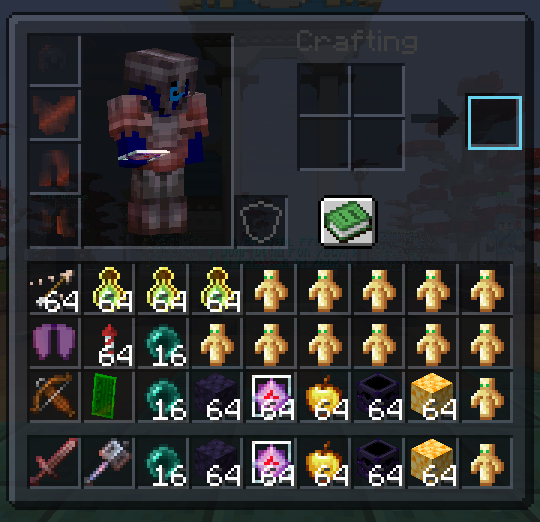

Clean Combat Hotbar
A lightweight resource pack that reworks the hotbar and inventory screen into a sleek, low-clutter combat HUD — dark slate tones, a crisp glowing selection outline, and a translucent inventory so you're never fully blind to what's happening around you.
Features
- Slim dark hotbar with subtle slot dividers, no chunky vanilla bevels
- Bright cyan selection outline with small corner accents
- Properly aligned offhand slot (shield/totem sits centered, not clipped)
- Reworked, translucent inventory screen — see a bit of your surroundings while sorting items mid-fight
- No other textures or gameplay changes — purely visual
Compatibility
- Minecraft: 1.21.11
- Works alongside other resource packs (place above them in the list)
Credits
Made by Fraktu
Quick facts
- Edition: Minecraft Java
- File type: .zip (resource pack)
- Minecraft version listed: 1.21.11
- How to install: Download the .zip resource pack — do not unzip it. → Put it in .minecraft/resourcepacks. → Enable it in Options → Resource Packs.
- Where to get it: Opens on Modrinth — not every file is mirrored on our own servers.
Install steps are the general flow for this file type — How to install Minecraft Java resource packs walks through it step by step.
Verified by MCModsHub
- Downloads as Clean_Combat_Hotbar.zip
- Download size: 6 KB
- Download link checked 15 Sept 2026 — working
These come from our own check of the pack file, not from the source page.