
Camille's Cheaper rails
Java mod listed for Minecraft 1.21. Downloads from the MC Java Mods app on Android.
This datapack tweaks the recipes of all vanilla rails by making them cheaper and thus more worth to use. I recommend to pair this datapack with a mod that…
⬇ Download on Modrinth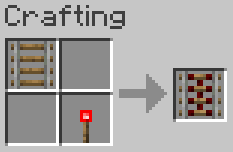
Cheaper Rails
What is this
Cheaper Utensils is a simple, lightweight Minecraft datapack that tweaks all the vanilla rails recipes.
Why is this
Rails are too expensive.
Modified Recipes
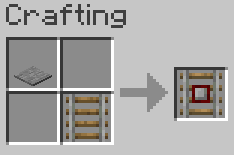
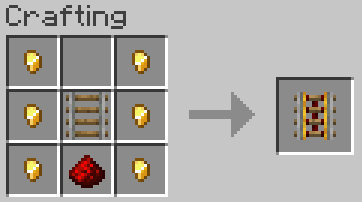
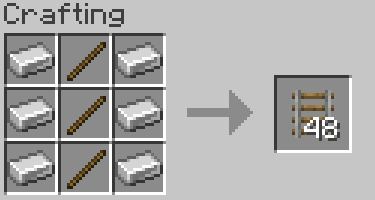
This datapack overrides the default crafting recipes to reduce the material cost for the following items:
- Rail
- Activator rail
- Detector rail
- Powered rail
Supported Versions:
TLDR: only 1.21.11 officially but should work from 1.19 to 1.21.x
For now I have only tested 1.21.11 as it's the game version I'm playing but it should be fully compatible with Minecraft 1.19 through 1.21.x, that's why I uploaded another pack version in 'alpha' for all those game versions so you can download it and try for yourself. I'm gonna tried a few game versions myself and if it works I will add them to the 'release' pack version.
Installation:
Simply drop the cheaperrails.zip file into your world's datapacks folder or download the mod version.
/!\ Beware: If you notice in-game that some of the recipes don't work (they're still the vanilla ones), try using the datapack version instead of the mod. The issue is likely due to the load-order, another mod is probably overriding my recipes. Datapacks load after mods, so this fixes the problem.
- Edition: Minecraft Java
- File type: .jar
- Minecraft version listed: 1.21.11
- How to install: Install the matching mod loader (Forge, Fabric or NeoForge) for your Minecraft version. → Download the .jar. → Put it in the .minecraft/mods folder and launch that loader profile.
- Where to get it: Opens on Modrinth — not every file is mirrored on our own servers.
Install steps are the general flow for this file type — How to install Minecraft Java mods & modpacks walks through it step by step.
- Ships as camilles-cheaper-rails-1.0.0.jar — drop this file into the mods folder
- Download size: 12 KB
- Download link checked 26 Oct 2026 — working
These come from our own check of the pack file, not from the source page.