
CatCraftTitle
插件作用
CatCraftTitle 是一个轻量级、支持GUI管理、中英双语、功能完善的 Minecraft 头衔与后缀管理插件,支持 MySQL / PostgreSQL / SQLite 三种数据库,帮助服务器轻松实现玩家头衔系统,并支持跨服同步。
内置商店系统,玩家可通过金币购买称号,并支持每日签到领取金币。
全新 1.2.5 版本 新增 管理员 GUI 控制面板、基于 PlaceholderAPI 的自动称号系统(属性插件支持)、实时语言切换 以及 独立功能开关,让管理更高效、体验更流畅。
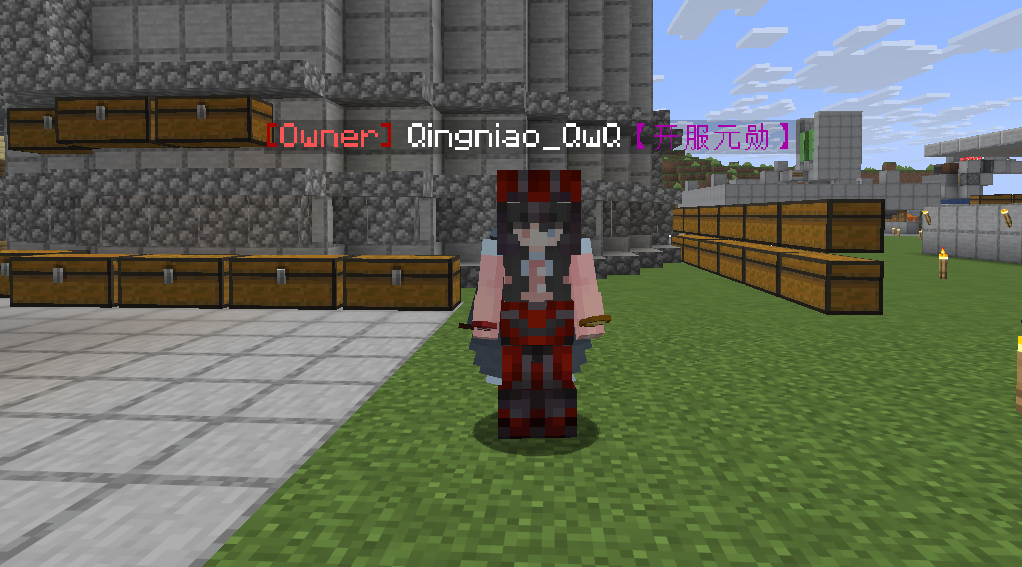
功能特点
- ✅ 多级头衔体系:每个玩家可拥有多个头衔,按 ID 独立管理,自由切换启用
- ✅ 独立后缀系统:头衔与后缀分离设计,玩家可单独控制每个后缀的启用/关闭
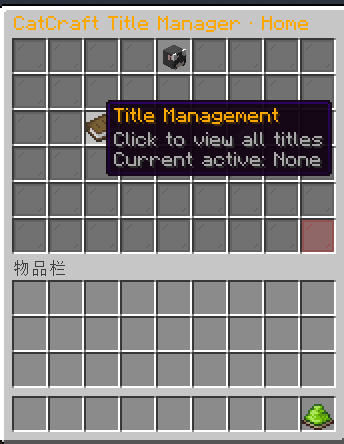
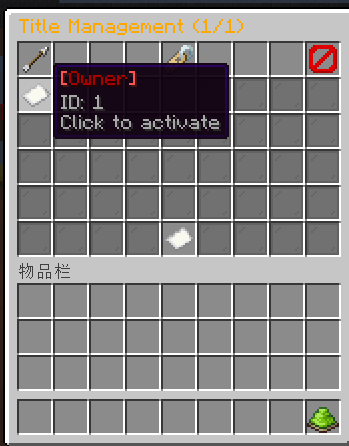
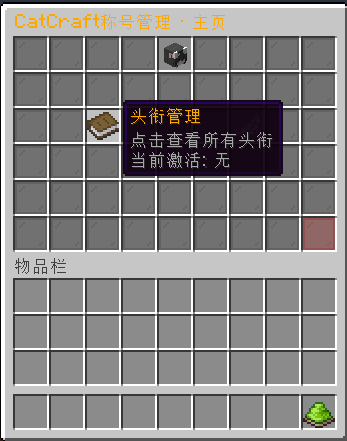
- ✅ 图形化 GUI 管理:玩家可通过
/catcraft gui打开直观的界面管理所有称号 - ✅ 管理员 GUI 控制面板(1.2.5 新增):通过
/titleadmin panel一键查看服务器状态、切换语言、开关功能、重载配置,无需敲命令 - ✅ 自动称号系统(属性插件支持)(1.2.5 新增):基于 PlaceholderAPI 占位符,根据玩家等级、金币、击杀数等任意属性自动授予或移除称号,支持
>=、<=、==、!=、>、<运算符,灵活配置 - ✅ 实时语言切换(1.2.5 新增):管理员可在 GUI 面板中一键切换中英文,所有消息即时生效,无需重启
- ✅ 独立功能开关(1.2.5 新增):独立控制 RGB 渐变色、内置商店、属性插件支持,按需启用,默认全部关闭
- ✅ 跨服数据同步:支持 MySQL / PostgreSQL,多服务器共享玩家数据
- ✅ 本地存储备选:MySQL/PostgreSQL 失败自动切换 SQLite,数据不丢失
- ✅ 无需重启修改:管理员可直接修改头衔显示名,即时生效
- ✅ 玩家自助管理:玩家可通过指令或 GUI 管理自己的头衔和后缀
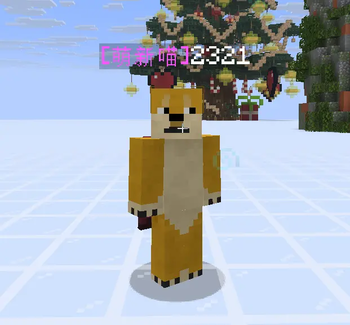
- ✅ 默认头衔系统:无头衔玩家自动显示自定义默认头衔(可配置)
- ✅ RGB 渐变色支持:可启用炫彩渐变头衔/后缀,颜色自定义
- ✅ 完全国际化:支持中文/英文一键切换,命令帮助和 GUI 界面全翻译
- ✅ PlaceholderAPI 支持:提供
%catcraft_title%、%catcraft_suffix%和%catcraft_balance%变量 - ✅ Minecraft 传统颜色代码支持:
&e等格式 - ✅ 内置商店与金币系统:管理员可添加商品(头衔/后缀),玩家使用金币购买;每日签到可获得金币
- ✅ 启动信息看板:控制台显示服务器版本、数据库状态、PAPI 状态
⚠️ 注意事项
- ⚠️ 必须使用 PlaceholderAPI 作为前置
- ⚠️ 若使用 PostgreSQL,请确保服务端已安装对应驱动(插件已内置)
- ⚠️ 从 1.2.3 升级到 1.2.4 时,强烈建议删除
.\plugins\CatCraftTitle\config.yml文件,让插件生成包含新配置项的干净配置文件,否则新功能可能无法正常使用或出现未知 BUG。玩家数据库不受影响,无需删除或迁移。
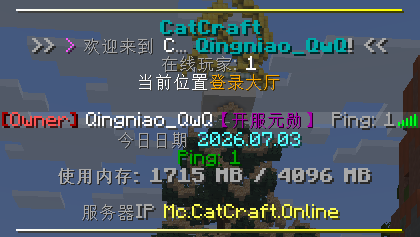
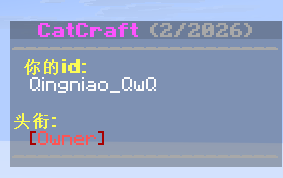
头衔以及后缀统一管理 - GUI界面
管理员 GUI 控制面板(1.2.5 新增)
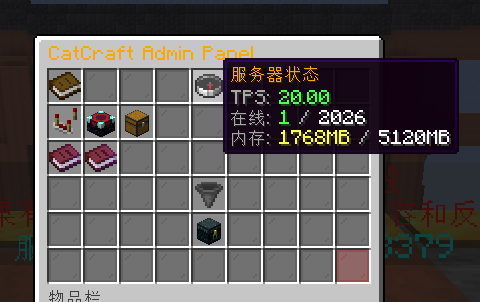 (示例图片,实际界面以插件为准)
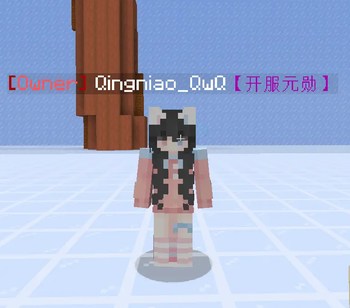
插件支持自定义玩家ID以及发出的文字颜色

📦 兼容服务端
- ✅ Paper 1.16.x ~ 26.2
- ✅ Purpur 1.16.x ~ 26.2
- ✅ Spigot 1.16.x ~ 26.2
- ✅ Folia 1.16.x ~ 26.2
- ❌ Bukkit(不推荐)
- ❌ Sponge / BungeeCord / Velocity(不支持)
📦 兼容数据库
- ✅ MySQL
- ✅ PostgreSQL
- ✅ SQLite(内置)
必要前置
| 前置插件 | 必需性 | 说明 |
|---|---|---|
| PlaceholderAPI | ⚠️ 必须 | 变量支持与自动称号条件解析 |
| MySQL / PostgreSQL | 可选 | 跨服数据库(若不使用则自动使用 SQLite) |
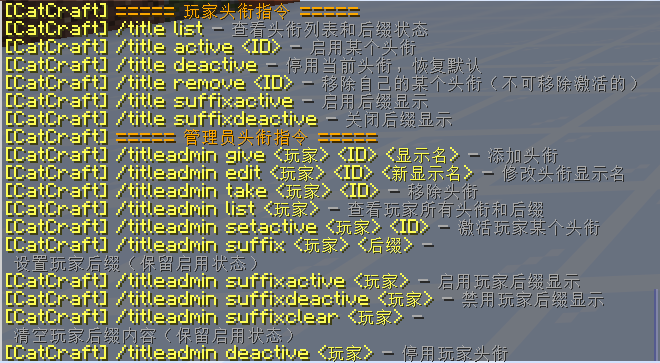
玩家指令
| 指令 | 说明 |
|---|---|
/catcraft gui |
打开图形化称号管理界面 |
/catcraft shop |
打开商店首页(头衔/后缀分类购买) |
/catcraft list |
查看自己拥有的所有头衔和后缀及其激活状态 |
/catcraft active <ID> |
激活指定ID的头衔 |
/catcraft deactive |
停用当前激活的头衔,恢复默认 |
/catcraft suffixactive <ID> |
激活指定ID的后缀 |
/catcraft suffixdeactive |
停用当前激活的后缀 |
/catcraft remove <ID> |
移除自己拥有的某个称号(头衔或后缀),不能移除当前激活的 |
管理员指令(需 catcraft.admin 权限)
控制面板(1.2.4 新增)
| 指令 | 说明 |
|---|---|
/titleadmin panel |
打开管理员 GUI 控制面板,实时查看服务器状态、切换语言、开关功能、重载配置 |
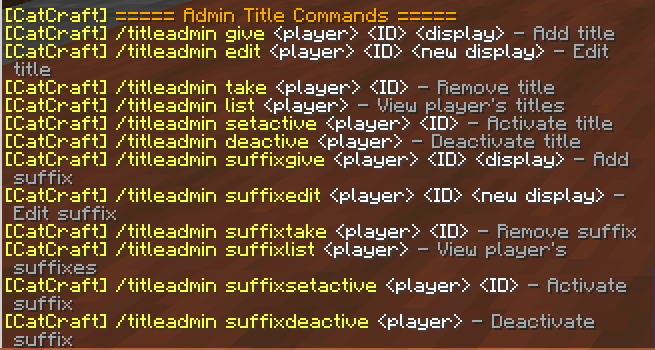
头衔管理
| 指令 | 说明 |
|---|---|
/titleadmin give <玩家> <ID> <显示名> |
为玩家添加一个头衔(ID必须全局唯一) |
/titleadmin edit <玩家> <ID> <新显示名> |
修改玩家某个头衔的显示名 |
/titleadmin take <玩家> <ID> |
移除玩家的某个头衔(不能移除激活的) |
/titleadmin list <玩家> |
查看玩家拥有的所有头衔及其激活状态 |
/titleadmin setactive <玩家> <ID> |
激活玩家的某个头衔 |
/titleadmin deactive <玩家> |
停用玩家当前激活的头衔 |
后缀管理
| 指令 | 说明 |
|---|---|
/titleadmin suffixgive <玩家> <ID> <显示名> |
为玩家添加一个后缀(ID必须全局唯一) |
/titleadmin suffixedit <玩家> <ID> <新显示名> |
修改玩家某个后缀的显示名 |
/titleadmin suffixtake <玩家> <ID> |
移除玩家的某个后缀(不能移除激活的) |
/titleadmin suffixlist <玩家> |
查看玩家拥有的所有后缀及其激活状态 |
/titleadmin suffixsetactive <玩家> <ID> |
激活玩家的某个后缀 |
/titleadmin suffixdeactive <玩家> |
停用玩家当前激活的后缀 |
商店管理
| 指令 | 说明 |
|---|---|
/titleadmin shop add <ID> <类型(0/1)> <价格> <显示名> |
添加一个商品到头衔商店或后缀商店 |
/titleadmin shop remove <ID> <类型> |
从商店移除指定商品 |
/titleadmin shop setprice <ID> <类型> <新价格> |
修改商品价格 |
/titleadmin shop list |
列出所有商品 |
/titleadmin shop givebalance <玩家> <金额> |
增加玩家金币 |
/titleadmin shop setbalance <玩家> <金额> |
设置玩家金币为指定值 |
/titleadmin shop toggle |
提示通过配置文件开关商店 |
类型:
0表示头衔,1表示后缀。
权限节点
| 权限 | 说明 |
|---|---|
catcraft.admin |
管理员权限,允许使用所有 /titleadmin 命令(包括 /titleadmin panel) |
catcraft.title.set |
兼容旧版权限(暂未使用) |
注:玩家指令无需额外权限,任何玩家均可使用。
PlaceholderAPI 变量
| 变量 | 说明 |
|---|---|
%catcraft_title% |
玩家当前激活的头衔显示名(含颜色/RGB) |
%catcraft_suffix% |
玩家当前激活的后缀显示名(含颜色/RGB) |
%catcraft_balance% |
玩家当前金币余额(整数) |
配置文件(自动生成,示例)
# 语言设置 (zh / en)
language: zh

# 数据库配置
database:
  type: sqlite
  mysql:
    host: localhost
    port: 3306
    db: minecraft
    user: root
    pass: "your_password"
  postgresql:
    host: localhost
    port: 5432
    db: minecraft
    user: root
    pass: "your_password"
  sqlite:
    file: catcraft.db

permissions:
  admin: "catcraft.admin"

settings:
  debug: true
  enable-rgb: false          # 是否启用RGB渐变(默认关闭)
  attribute-support: false   # 是否启用属性插件支持(自动称号系统,默认关闭)
  check-update: true         # 是否检查更新

# 商店系统配置
shop:
  enabled: false             # 是否启用商店(默认关闭)
  default-balance: 0         # 新玩家默认金币
  signin-reward: 30          # 每日签到奖励金币数

# 自动称号规则(仅当 attribute-support 为 true 时生效)
auto-rules:
  - id: 1
    type: 0                    # 0=头衔,1=后缀
    display: "&6[&e老手&6]"    # 显示的称号文本
    condition: "%player_level% >= 30"
  - id: 2
    type: 1
    display: " &8[&7大佬&8]"
    condition: "%vault_eco_balance% > 1000"
数据库结构(统一表 player_titles)
-- 原称号表 player_titles CREATE TABLE player_titles ( uuid VARCHAR(36) NOT NULL, title_id INT NOT NULL, title_display VARCHAR(128) NOT NULL, type INT DEFAULT 0, is_active BOOLEAN DEFAULT FALSE, PRIMARY KEY (uuid, title_id) ); -- 说明:type 0=头衔, 1=后缀;is_active 表示是否启用
-- 新增商店表 shop_items CREATE TABLE shop_items ( id INT PRIMARY KEY, type INT NOT NULL, display VARCHAR(128) NOT NULL, price INT NOT NULL ); -- 说明:type 0=头衔商品, 1=后缀商品
-- 新增余额表 player_balances CREATE TABLE player_balances ( uuid VARCHAR(36) PRIMARY KEY, balance INT NOT NULL DEFAULT 0 );
-- 新增签到表 player_signin CREATE TABLE player_signin ( uuid VARCHAR(36) PRIMARY KEY, last_signin BIGINT NOT NULL DEFAULT 0 );
所有表在插件首次启动时自动创建,无需手动操作。
⚠️ 常见问题
Q:没有头衔显示什么?
A:默认显示配置的 default-title,默认为 &d[&d萌新喵]&7
Q:MySQL/PostgreSQL 连接失败怎么办?
A:自动切换 SQLite,无需手动处理
Q:支持 RGB 颜色吗?
A:支持。将 settings.enable-rgb 设为 true,并可自定义 rgb-colors 数组
Q:如何切换语言?
A:修改 language 为 zh 或 en,重启服务器即可
Q:更新检测报 SSL 错误?
A:请升级 Java 版本至 11 或以上;或手动导入 GitHub SSL 证书
Q:升级到新版本后商店文字不显示?
A:请删除config.yml并重启,让插件重新生成,即可获得新的消息键值。
开源协议
MIT License — 允许自由使用、修改、分发,需保留原作者声明。
作者
QingNiaoQaQ (CatCraft Team)
GitHub: https://github.com/qingniaoQwQ
鸣谢
感谢所有使用和贡献本插件的玩家与开发者!
CatCraftTitle
Plugin Description
CatCraftTitle is a lightweight, GUI‑managed, bilingual (Chinese/English) Minecraft title and suffix management plugin with full support for MySQL, PostgreSQL, and SQLite. It helps servers easily implement player title systems with cross‑server data synchronization.
Built‑in shop system allows players to purchase titles with coins, and daily sign‑in rewards are also supported.
The brand‑new 1.2.5 version introduces an Admin GUI Control Panel, a PlaceholderAPI‑based automatic title system (attribute plugin support), real‑time language switching, and independent feature toggles, making administration more efficient and the user experience smoother.
Features
- ✅ Multi‑level title system – Each player can own multiple titles, managed independently by ID, and switch activation freely.
- ✅ Independent suffix system – Titles and suffixes are separated; players can enable/disable each suffix individually.
- ✅ Graphical GUI management – Players can open
/catcraft guito manage all their titles through an intuitive interface. - ✅ Admin GUI Control Panel (new in 1.2.5) – Use
/titleadmin panelto view server status, switch languages, toggle features, and reload configurations with one click – no manual commands needed. - ✅ Automatic title system (attribute plugin support) (new in 1.2.5) – Based on PlaceholderAPI placeholders, automatically grants or removes titles according to any player attribute (level, money, kills, etc.). Supports operators
>=,<=,==,!=,>,<for flexible rules. - ✅ Real‑time language switching (new in 1.2.5) – Admins can switch between Chinese and English instantly via the GUI panel, no server restart required.
- ✅ Independent feature toggles (new in 1.2.5) – Independently enable/disable RGB gradients, built‑in shop, and attribute plugin support; all are disabled by default and can be turned on as needed.
- ✅ Cross‑server data synchronization – Supports MySQL and PostgreSQL for sharing player data across multiple servers.
- ✅ Local storage fallback – Automatically falls back to SQLite if MySQL/PostgreSQL fails, so no data is lost.
- ✅ No restart required for modifications – Admins can change title display names instantly.
- ✅ Player self‑service – Players can manage their titles and suffixes via commands or GUI.
- ✅ Default title system – Players without a title automatically see a customisable default title.
- ✅ RGB gradient support – Enable colourful gradient titles/suffixes with customisable colours.
- ✅ Fully internationalised – One‑click switch between Chinese and English; command help and GUI are fully translated.
- ✅ PlaceholderAPI support – Provides
%catcraft_title%,%catcraft_suffix%, and%catcraft_balance%placeholders. - ✅ Minecraft legacy colour codes – Supports
&eformat and similar. - ✅ Built‑in shop and coin system – Admins can add items (titles/suffixes); players buy them with coins; daily sign‑in grants coins.
- ✅ Startup info dashboard – Console shows server version, database status, and PAPI status.
⚠️ Important Notes
- ⚠️ PlaceholderAPI is required as a dependency.
- ⚠️ If using PostgreSQL, ensure the server has the appropriate driver installed (the plugin includes it).
- ⚠️ When upgrading from 1.2.3 to 1.2.4 or 1.2.5, it is strongly recommended to delete the
config.ymlfile located in.\plugins\CatCraftTitle\so that the plugin regenerates a clean configuration with all new settings. Failing to do so may prevent new features from working correctly or cause unexpected bugs. Player databases are unaffected – no need to delete or migrate them.
Unified Title & Suffix Management – GUI
Admin GUI Control Panel (new in 1.2.5)
(Screenshot is for illustration; actual interface may vary.)
Customise Player Display Name & Chat Colour
📦 Supported Server Software
- ✅ Paper 1.16.x – 26.2
- ✅ Purpur 1.16.x – 26.2
- ✅ Spigot 1.16.x – 26.2
- ✅ Folia 1.16.x – 26.2
- ❌ Bukkit (not recommended)
- ❌ Sponge / BungeeCord / Velocity (not supported)
📦 Supported Databases
- ✅ MySQL
- ✅ PostgreSQL
- ✅ SQLite (built‑in)
Required Dependencies
| Dependency | Required | Description |
|---|---|---|
| PlaceholderAPI | ⚠️ Required | Provides placeholder support and automatic title condition parsing |
| MySQL / PostgreSQL | Optional | For cross‑server databases (if not used, SQLite is used automatically) |
Player Commands
| Command | Description |
|---|---|
/catcraft gui |
Opens the graphical title management interface |
/catcraft shop |
Opens the shop home page (browse titles/suffixes by category) |
/catcraft list |
Lists all owned titles and suffixes with their activation status |
/catcraft active <ID> |
Activates the title with the given ID |
/catcraft deactive |
Deactivates the currently active title and reverts to default |
/catcraft suffixactive <ID> |
Activates the suffix with the given ID |
/catcraft suffixdeactive |
Deactivates the currently active suffix |
/catcraft remove <ID> |
Removes an owned title or suffix (cannot remove the currently active one) |
Admin Commands (require catcraft.admin permission)
Control Panel (new in 1.2.4)
| Command | Description |
|---|---|
/titleadmin panel |
Opens the Admin GUI Control Panel to view server status, switch language, toggle features, and reload config |
Title Management
| Command | Description |
|---|---|
/titleadmin give <player> <ID> <display> |
Gives a title to a player (ID must be globally unique) |
/titleadmin edit <player> <ID> <new display> |
Changes the display name of a player's title |
/titleadmin take <player> <ID> |
Removes a title from a player (cannot remove the active one) |
/titleadmin list <player> |
Lists all titles owned by a player with their activation status |
/titleadmin setactive <player> <ID> |
Activates a specific title for a player |
/titleadmin deactive <player> |
Deactivates the player's currently active title |
Suffix Management
| Command | Description |
|---|---|
/titleadmin suffixgive <player> <ID> <display> |
Gives a suffix to a player (ID must be globally unique) |
/titleadmin suffixedit <player> <ID> <new display> |
Changes the display name of a player's suffix |
/titleadmin suffixtake <player> <ID> |
Removes a suffix from a player (cannot remove the active one) |
/titleadmin suffixlist <player> |
Lists all suffixes owned by a player with their activation status |
/titleadmin suffixsetactive <player> <ID> |
Activates a specific suffix for a player |
/titleadmin suffixdeactive <player> |
Deactivates the player's currently active suffix |
Shop Management
| Command | Description |
|---|---|
/titleadmin shop add <ID> <type(0/1)> <price> <display> |
Adds an item to the title shop (0) or suffix shop (1) |
/titleadmin shop remove <ID> <type> |
Removes an item from the shop |
/titleadmin shop setprice <ID> <type> <new price> |
Changes the price of an item |
/titleadmin shop list |
Lists all shop items |
/titleadmin shop givebalance <player> <amount> |
Adds coins to a player |
/titleadmin shop setbalance <player> <amount> |
Sets a player's coin balance to a specific value |
/titleadmin shop toggle |
Shows a hint to enable/disable the shop via config.yml |
Type:
0= title,1= suffix.
Permission Nodes
| Permission | Description |
|---|---|
catcraft.admin |
Admin permission – allows use of all /titleadmin commands (including /titleadmin panel) |
catcraft.title.set |
Legacy permission (currently unused) |
Note: Player commands do not require any extra permission; all players can use them.
PlaceholderAPI Placeholders
| Placeholder | Description |
|---|---|
%catcraft_title% |
The player's currently active title display name (with colour/RGB) |
%catcraft_suffix% |
The player's currently active suffix display name (with colour/RGB) |
%catcraft_balance% |
The player's current coin balance (integer) |
Configuration (auto‑generated, example)
# Language setting (zh / en)
language: zh

# Database configuration
database:
  type: sqlite
  mysql:
    host: localhost
    port: 3306
    db: minecraft
    user: root
    pass: "your_password"
  postgresql:
    host: localhost
    port: 5432
    db: minecraft
    user: root
    pass: "your_password"
  sqlite:
    file: catcraft.db

permissions:
  admin: "catcraft.admin"

settings:
  debug: true
  enable-rgb: false          # Enable RGB gradient (default: false)
  attribute-support: false   # Enable automatic title system (default: false)
  check-update: true         # Check for updates

# Shop system configuration
shop:
  enabled: false             # Enable shop (default: false)
  default-balance: 0         # Default coins for new players
  signin-reward: 30          # Daily sign-in reward coins

# Auto‑title rules (only active when attribute-support is true)
auto-rules:
  - id: 1
    type: 0                    # 0 = title, 1 = suffix
    display: "&6[&eVeteran&6]" # Display text of the title/suffix
    condition: "%player_level% >= 30"
  - id: 2
    type: 1
    display: " &8[&7Master&8]"
    condition: "%vault_eco_balance% > 1000"
Database Structure (unified table player_titles)
| Column | Type | Description |
|---|---|---|
| uuid | VARCHAR(36) | Player UUID |
| title_id | INT | Title ID (globally unique) |
| title_display | VARCHAR(128) | Display name |
| type | INT | 0=title, 1=suffix |
| is_active | BOOLEAN | Whether active |
Titles and suffixes are stored in the same table, distinguished by
type, ensuring global ID uniqueness per player.
⚠️ FAQ
Q: What if a player has no title?
A: The plugin displays the configured default-title (default: &d[&dNewbie Meow]&7)
Q: What if MySQL/PostgreSQL connection fails?
A: The plugin automatically falls back to SQLite – no manual action needed.
Q: Does it support RGB colors?
A: Yes. Set settings.enable-rgb to true and customize rgb-colors array.
Q: How to switch language?
A: Change language to zh or en and restart the server.
Q: Update check gives SSL error?
A: Please upgrade Java to version 11 or higher; or manually import GitHub SSL certificate.
Q: After updating, shop messages don't appear?
A: Delete config.yml and restart to regenerate the file with the new message keys.
License
MIT License — free to use, modify, and distribute with attribution.
Author
QingNiaoQaQ (CatCraft Team)
GitHub: https://github.com/qingniaoQwQ
🙏 Credits
Thanks to all users and contributors!
- Edition: Minecraft Java
- File type: .jar
- Minecraft versions listed: 1.16, 1.16.1, 1.16.2
- How to install: Install the matching mod loader (Forge, Fabric or NeoForge) for your Minecraft version. → Download the .jar. → Put it in the .minecraft/mods folder and launch that loader profile.
- Where to get it: Opens on Modrinth — not every file is mirrored on our own servers.
Install steps are the general flow for this file type — How to install Minecraft Java mods & modpacks walks through it step by step.
- Ships as CatCraftTitle-1.2.5.jar — drop this file into the mods folder
- Download size: 75 KB
- Download link checked 25 Aug 2026 — working
These come from our own check of the pack file, not from the source page.