
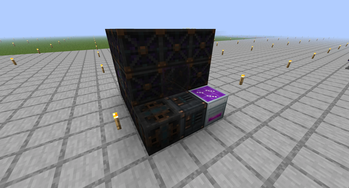
Anti Magick
Anti Magick adds a powered containment system for Minecraft 1.21.1 on NeoForge. It creates a configurable field that suppresses selected supernatural mechanics while leaving ordinary gameplay, technology, and building systems untouched.
How It Works
- Build the
3x3x3containment structure. - Place the controller beside the observation glass and supply FE.
- Open the controller and wait for the BIOS check to complete.
- Create an owner account on first launch, then sign in.
- Configure categories and radius through the A.M. OS console.
- Start the field and connect powered relays if a larger coverage area is needed.
The controller requires authentication for every new session. The world stores only a salt and cryptographic hash of the credentials, never the plain login or password.
Console Commands
/help
/status
/status energy
/radius 128
/block enchantments
/block teleport
/unblock teleport
/start
/stop
/categories
/passwd current_password new_password
Every command runs on the server and returns a response in the controller console.
Core Mechanics
Categories can be enabled independently. The Core module supports selected vanilla mechanics, including:
- enchantments and enchanted equipment;
- teleportation, Ender Pearls, and Chorus Fruit;
- dimension travel and portals;
- Totems of Undying;
- spawn eggs;
- beacons, conduits, and enchanting tables;
- ritual summons of the Wither, golems, and Ender Dragon;
- sculk, Wardens, trial spawners, vaults, and ominous mechanics;
- Evoker magic, including wololo;
- selected lightning transformations;
- End artifacts and death-related items.
Add-ons
Core does not depend on third-party magic mods and does not suppress every modded item. Optional add-ons extend Anti Magick for supported mods:
- Ars Nouveau;
- NeoOrigins;
- The Aether;
- Deeper and Darker;
- Twilight Forest;
- Bosses of Mass Destruction;
- Etherology;
- Companions;
- Bonfires;
- Staff Mod.
Each add-on must be installed together with Anti Magick and its target mod.
Scope
Anti Magick intentionally does not suppress ordinary alchemy, brewing stands, standard potion effects, food, sleep, natural spawning, Elytra flight, normal tools, technology, construction, or decorative mechanics.
Requirements
- Minecraft: Java Edition 1.21.1
- NeoForge 21.1.x
- Java 21
- Required on both the client and server
———
Русский
Anti Magick добавляет в Minecraft 1.21.1 для NeoForge энергетический комплекс, создающий настраиваемое поле подавления выбранных сверхъестественных механик. Обычный игровой процесс, технические и строительные системы не затрагиваются.
Как это работает
- Соберите удерживающую конструкцию 3x3x3.
- Установите контроллер рядом со смотровым стеклом и подайте FE.
- Откройте контроллер и дождитесь завершения BIOS-проверки конструкции и питания.
- При первом запуске создайте учётную запись владельца, затем войдите в систему.
- Настройте категории и радиус через консоль A.M. OS.
- Запустите поле и при необходимости подключите питаемые ретрансляторы для расширения зоны действия.
Контроллер требует авторизации при каждом новом открытии. В мире сохраняются только соль и криптографический хеш учётных данных, без открытого логина и пароля.
Управление через консоль
/help /status /status energy /radius 128 /block enchantments /block teleport /unblock teleport /start /stop /categories /passwd текущий_пароль новый_пароль
Каждая команда выполняется на сервере и выводит ответ в журнале консоли.
Подавляемые механики Core
Категории можно включать и выключать независимо друг от друга. Базовый мод поддерживает выбранные ванильные механики:
- зачарования и зачарованное снаряжение;
- телепортацию, жемчуг Края и плоды хоруса;
- переходы между измерениями и порталы;
- тотемы бессмертия;
- яйца призыва;
- маяки, проводники и стол зачарований;
- ритуальные призывы Визера, големов и дракона;
- скалк, Хранителя, trial spawner, vault и ominous-механики;
- магию заклинателя, включая wololo;
- отдельные превращения от молнии;
- артефакты Края и предметы, связанные со смертью.
Аддоны
Core не зависит от сторонних магических модов и не блокирует каждый модовый предмет. Отдельные аддоны добавляют поддержку Ars Nouveau, NeoOrigins, The Aether, Deeper and Darker, Twilight Forest, Bosses of Mass Destruction, Etherology, Companions, Bonfires и Staff Mod.
Каждый аддон устанавливается только вместе с Anti Magick и его целевым модом.
Границы мода
Anti Magick намеренно не отключает обычную алхимию, варочные стойки, стандартные эффекты, зелий, еду, сон, естественный спавн, элитры, обычные инструменты, технические, строительные и декоративные механики.
Совместимость
- Minecraft: Java Edition 1.21.1
- NeoForge 21.1.x
- Java 21
- Мод требуется и на сервере, и на клиентах игроков
- Edition: Minecraft Java
- File type: .jar
- Minecraft version listed: 1.21.1
- How to install: Install the matching mod loader (Forge, Fabric or NeoForge) for your Minecraft version. → Download the .jar. → Put it in the .minecraft/mods folder and launch that loader profile.
- Where to get it: Opens on Modrinth — not every file is mirrored on our own servers.
Install steps are the general flow for this file type — How to install Minecraft Java mods & modpacks walks through it step by step.
- Ships as antimagick-0.1.2.jar — drop this file into the mods folder
- Download size: 1.2 MB
- Download link checked 26 Aug 2026 — working
These come from our own check of the pack file, not from the source page.