
Directional Beacon Beams
Java mod listed for Minecraft 26.x. Downloads from the MC Java Mods app on Android.
Change the direction of the beacon beam of each individual beacon you place (client side only). You can also edit the shape of the beam and the colour…
⬇ Download on Modrinth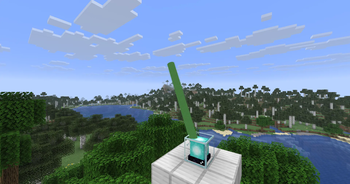
A client-only Fabric mod for Minecraft that lets you point a beacon's light beam in any direction and cap how far it travels — per beacon, no server-side installation required.
Point it anywhere — tilt and rotate a beacon's beam to any yaw/pitch instead of the vanilla straight-up beam. Cap the length — set a maximum beam length independently of the beacon's actual pyramid height, from 1 to 2048 blocks. Recolor it — pick any RGB color for the beam, independent of the stained-glass segments stacked above the beacon. Reshape it — choose the beam's cross-section: triangle, square (vanilla), octagon, or round, and adjust its thickness from 10% to 400% of vanilla. Per-beacon settings — every beacon remembers its own direction, length, color, shape, and thickness, stored locally per world/server. In-world editing — shift-right-click a beacon to open the beam editor; no commands or config file editing needed. Mod Menu integration — a global "Configure" screen (via [Mod Menu]) sets the default max length and lets you disable the mod entirely.
Shift-right-click any beacon block to open its beam editor. Changes are saved automatically and persist across sessions. Settings are stored client-side only, keyed by world/server + dimension + block position, so they follow the beacon even if you're not the one who placed it.
- Edition: Minecraft Java
- File type: .jar
- Minecraft version listed: 26.2
- How to install: Install the matching mod loader (Forge, Fabric or NeoForge) for your Minecraft version. → Download the .jar. → Put it in the .minecraft/mods folder and launch that loader profile.
- Where to get it: Opens on Modrinth — not every file is mirrored on our own servers.
Install steps are the general flow for this file type — How to install Minecraft Java mods & modpacks walks through it step by step.
- Ships as directional-beacon-beam-1.0.0.jar — drop this file into the mods folder
- Download size: 29 KB
- Download link checked 6 Oct 2026 — working
These come from our own check of the pack file, not from the source page.