
Lovic's Better Command Block
Java mod listed for Minecraft 1.20. Downloads from the MC Java Mods app on Android.
This project adds an enhanced user interface and advanced editing features to standard command blocks, making command creation much easier and more…
⬇ Download on Modrinth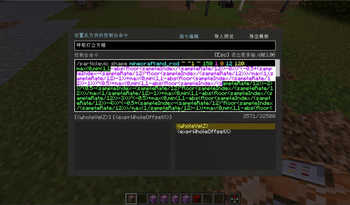
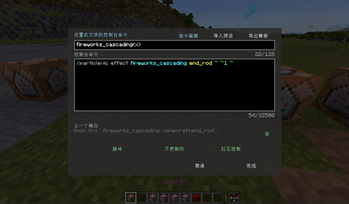
Lovic's Better Command Block (English Description)
Better Command Block UI —— A command block GUI enhancement mod built for map makers and command creators.
| Detail | Description |
|---|---|
| Mod ID | lovicsbettercommandblock |
| Current Version | 1.1.1 |
| Game Version | Minecraft Java Edition 1.20.1 |
| Loader | Fabric (Fabric API Required) |
| Author | ZhuHongMing (Bilibili: 洛维Lovic) |
Introduction
Lovic's Better Command Block (LBCB) fully optimizes the command block editing experience without changing vanilla command block mechanics:
- Large multi-line text field with auto-wrap and smooth vertical scrolling
- Command syntax highlighting and vanilla-style auto-completion
- Custom names, hand-held editing, and rich tooltips
- Command preset system: Export / import
.pvictemplates, sharing the config folder with VicColor - Alt+C to quickly copy integer coordinates of the block you are looking at
Perfect for map creators, server admins, and advanced technical players who constantly write, debug, and reuse command blocks.
Requirements
- Minecraft Java Edition 1.20.1
- Fabric Loader (≥ 0.15.0 recommended)
- Fabric API
- Place the
.jarinto your game'smodsfolder
Features
UI Enhancements
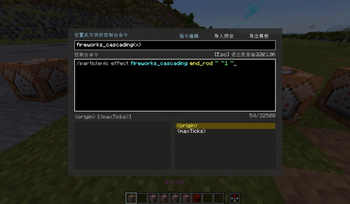
Right-clicking a command block (or command block minecart) opens the newly designed GUI:
| Feature | Description |
|---|---|
| Multi-line Field | Replaces the single-line input; wraps long commands with mouse scroll support |
| Syntax Highlighting | Unparsed segments, literals, and parameters are distinguished by colors |
| Auto-completion | Retains vanilla Brigadier suggestions, displayed in an independent panel |
| Undo / Redo | Text undo/redo actions are fully supported within the input field |
| Focus Mode | Focus the input field during deep edits; press Esc or click × to exit focus |
| Custom Names | Add a custom name at the top; persists even after reloading the world |
| Name Plates | Looking at a named command block displays its custom name hovering above |
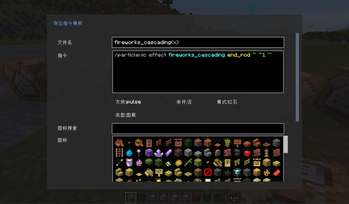
The top of the interface provides three tabs:
- Edit Command — Daily command block editing
- Import Preset — Instantly import a configuration from the
.pvicpreset list - Export Template — Export the current command block settings as a
.pvicfile
Hand-held Editing
While holding a Command Block or Command Block Minecart item:
- Middle-Click (Without holding Ctrl): Directly opens the editing UI for the held item
- Hold Ctrl + Middle-Click: Performs the vanilla "Pick Block" behavior
Edited data is saved directly to the item's NBT and applies once placed in the world.
Tooltip Details
Hover over a command block item that contains data:
- Default hint: Hold [Ctrl] to view detailed information
- While holding Ctrl: Displays command content, block type (Impulse/Chain/Repeat), conditional status, redstone control, and output tracking
Command Presets
LBCB offers a complete template workflow. The preset files use the .pvic format and share a directory with the VicColor mod:
config/viccolor/custom/
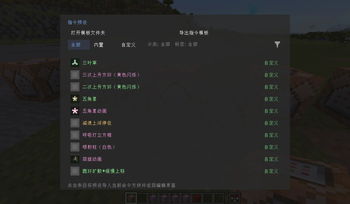
Preset Menu
- Press
\\in-game (Backslash key, default, rebindable in Controls) - Browse built-in and custom presets, filterable by categories and tags
- Click an entry to obtain a preset item that generates the configured command block upon placement
- Features buttons to "Open Template Folder" and "Export Command Template" inside the menu
GUI Importing
- Open the command block GUI
- Switch to the "Import Preset" tab
- Click your target preset → Auto-imports and returns to the "Edit Command" page
Template Exporting
- Switch to the "Export Template" tab in the GUI
- Fill in the name, select an icon, block type, tags, etc.
- Exports as a
.pvicfile to the config directory (supports sub-folders)
You can assign the LBCB-exclusive "command" tag (displayed in cyan) to make pure command templates easy to identify.
Preset Tags
| Tag | Meaning |
|---|---|
| pattern | Pattern-based presets |
| animation | Animation-based presets |
| text | Text-based presets |
| command | LBCB-exclusive "Command" templates |
Copy Coordinates
Aim at any block and press Alt + C:
- Copies the integer coordinates of the targeted block to your clipboard
- Format:
x y z(three integers, separated by a single space) - Rounding logic is identical to the vanilla F3 + I data copy
- Upon success, a chat message will confirm the copy
Only works when looking directly at a block; does not copy when pointing at air or entities.
Keybinds
| Key | Function |
|---|---|
\ |
Open the command preset menu (rebindable) |
| Alt + C | Copy integer coordinates of targeted block |
| Middle-Click (Holding block, no Ctrl) | Open editing GUI for the held item |
| Ctrl + Hover | View detailed tooltips on command block items |
| Esc (When focused) | Exit input field focus |
Keybinds can be adjusted in Options → Controls → Lovic's Better Command Block (Alt+C is a global key combination and currently has no separate rebind option).
Compatibility
- Preset folder is unified at
config/viccolor/custom/ .pvicfile structures are completely compatible with VicColor; LBCB's newcommandtag is ignored by VicColor and won't affect its normal operation- Can be used standalone for preset features without installing VicColor
FAQ
Q: The interface didn't change after installation?
A: Please ensure your game version is 1.20.1, and both Fabric Loader and Fabric API are correctly installed. The mod jar must be in the mods folder. You must be in Creative Mode or have OP permissions to edit command blocks.
Q: The preset list is completely empty?
A: Move .pvic files into config/viccolor/custom/ (or its sub-folders), or click "Export Command Template" in the preset menu to create a new one.
Q: Command content is lost after exporting a template?
A: This issue where command text went missing when returning from the "Export Template" page has been fixed since version 1.1.0. Please update to the latest version.
Q: Command block custom names disappear after reloading the world?
A: Fixed since 1.1.0; custom display names are now saved persistently.
Q: Game crashes when middle-clicking a held block?
A: Fixed since 1.1.0; please update to the latest release.
Q: What should I know when upgrading from the old bettercommandblock?
A: Please delete the old bettercommandblock-*.jar and use lovicsbettercommandblock-1.1.1.jar. The Mod ID has been changed to lovicsbettercommandblock. Saved custom names and preset items from older worlds will automatically migrate from old NBT keys (BCBDisplayName, etc.) and will overwrite with new keys (LBCBDisplayName, etc.) upon saving.
Q: Mod icon doesn't display in launchers like PCL?
A: Please use the official release build jar that embeds assets/lovicsbettercommandblock/icon.png.
Changelog
1.1.1
- Copy Coordinates: Press Alt+C while aiming at a block to copy its integer coordinates
x y z(matching F3+I rounding logic).
1.1.0
- New Features: Command preset system, import/export pagination, custom cyan "command" tag, hand-held middle-click editing, and persistent custom names.
- UI Tweaks: Text color in the custom name box changed to white; reworked multi-line fields and tab layout interfaces.
- Bug Fixes: Resolved major bugs including text loss when exiting the export page, name resetting on reload, and crashes triggered by hand-held middle-clicks.
License & Contact
- QQ Group / Author QQ: 656147529
- License: This mod is released under the MIT License. Feedbacks and suggestions are always welcome!
洛维的更好的命令方块界面
更好的命令方块界面 —— 为地图制作与指令创作而生的命令方块 GUI 增强模组。
| 项目 | 说明 |
|---|---|
| 模组 ID | lovicsbettercommandblock |
| 当前版本 | 1.1.1 |
| 游戏版本 | Minecraft Java Edition 1.20.1 |
| 加载器 | Fabric(需安装 Fabric API) |
| 作者 | ZhuHongMing(朱宏明)(B站:洛维Lovic) |
简介
Lovic's Better Command Block(简称 LBCB)在不改变原版命令方块机制的前提下,全面优化命令方块的编辑体验:
- 更大的多行指令输入框,支持自动换行与平滑纵向滚动
- 指令语法高亮与原版风格的自动补全
- 自定义名称、手持编辑、丰富 tooltip
- 指令预设系统:导出 / 导入
.pvic模板,与 VicColor 共用配置目录 - Alt+C 快速复制准心所指方块的整数坐标
适合经常编写、调试、复用命令方块的地图作者、服务器管理员与指令玩家。
安装要求
- 已安装 Minecraft Java Edition 1.20.1
- 已安装 Fabric Loader(建议 ≥ 0.15.0)
- 已安装 Fabric API
- 将本模组
.jar放入游戏的mods文件夹
功能特性
界面增强
右键打开命令方块(或命令方块矿车)时,将看到重新设计的 GUI:
| 特性 | 说明 |
|---|---|
| 多行指令框 | 替代原版单行输入,长指令可换行显示,支持滚轮滚动 |
| 语法高亮 | 未解析片段、字面量、参数等以不同颜色区分 |
| 自动补全 | 保留原版 Brigadier 建议,并在独立面板中展示 |
| 撤销 / 重做 | 在指令框内支持文本撤销操作 |
| 聚焦模式 | 深度编辑指令时可聚焦输入框;按 Esc 或点击 × 退出聚焦 |
| 自定义名称 | 顶部可选填「命令方块名称」,重进存档后仍会保留 |
| 名称浮标 | 对准已命名的命令方块时,方块上方会显示自定义名称 |
界面顶部提供三个分页标签:
- 指令编辑 — 日常编辑命令方块
- 导入预设 — 从
.pvic预设列表一键导入当前配置 - 导出模板 — 将当前命令方块导出为
.pvic文件
手持编辑
手持命令方块或命令方块矿车物品时:
- 鼠标中键(不按 Ctrl):直接打开该物品的编辑界面
- 按住 Ctrl 再按中键:仍执行原版「选取方块」行为
编辑后的数据会保存在物品 NBT 中,放置到世界后生效。
物品提示
将鼠标悬停在已配置数据的命令方块物品上:
- 默认显示提示:按住 [Ctrl] 查看详细信息
- 按住 Ctrl 时显示:指令内容、类型(脉冲/连锁/循环)、条件制约、红石控制、记录输出等
指令预设
LBCB 提供完整的指令模板工作流,预设文件格式为 .pvic,与 VicColor 模组共用目录:
config/viccolor/custom/
预设菜单
- 在游戏中按
\\(反斜杠键,默认键位,可在「控制」中修改) - 浏览内置与自定义预设,可按分类、标签筛选
- 点击条目可获得预设物品,放置后生成对应配置的命令方块
- 界面内可「打开模板文件夹」「导出指令模板」
界面导入
- 打开命令方块编辑界面
- 切换到 「导入预设」 标签
- 点击目标预设 → 自动导入并返回 「指令编辑」 页
模板导出
- 在命令方块 GUI 切换到 「导出模板」 标签
- 填写名称、选择图标、方块类型、标签等
- 导出为
.pvic到指定目录(每次可选择子目录)
导出时可选择 LBCB 专用 「指令」 标签(界面中以青色显示),便于在预设列表中识别纯指令类模板。
预设标签
| 标签 | 含义 |
|---|---|
| pattern | 图案类预设 |
| animation | 动画类预设 |
| text | 文字类预设 |
| command | LBCB 专用「指令」类预设 |
坐标复制
对准任意方块后按 Alt + C:
- 将准心指向方块的整数坐标复制到剪贴板
- 格式:
x y z(三个整数,单个空格分隔) - 取整逻辑与原版 F3 + I 复制方块数据一致
- 复制成功后,聊天栏会提示「服务端方块整数坐标数据已复制到剪切板」
仅当准心指向方块时生效;对准空气或实体不会复制。
快捷键
| 按键 | 功能 |
|---|---|
\ |
打开指令预设菜单(可改键) |
| Alt + C | 复制准心方块整数坐标 |
| 鼠标中键(手持命令方块,未按 Ctrl) | 打开手持物品编辑界面 |
| Ctrl + 悬停 | 查看命令方块物品详细 Tooltip |
| Esc(指令框聚焦时) | 退出聚焦输入框 |
键位可在 选项 → 控制 → Lovic's Better Command Block 中调整(Alt+C 为全局组合键,暂无独立改键项)。
模组联动
- 预设目录统一为
config/viccolor/custom/ .pvic文件格式兼容 VicColor;LBCB 新增的command标签会被 VicColor 忽略,不影响 VicColor 正常读取- 不安装 VicColor 也可单独使用 LBCB 的预设功能
常见问题
Q:安装后界面没有变化?
A:请确认游戏版本为 1.20.1、Fabric Loader 与 Fabric API 均已正确安装,且模组 jar 位于 mods 文件夹。需使用创造模式或拥有 OP 权限才能编辑命令方块。
Q:预设列表为空?
A:将 .pvic 文件放入 config/viccolor/custom/(或其子文件夹),或在预设菜单中点击「导出指令模板」创建新预设。
Q:导出模板后指令丢失?
A:1.1.0 起已修复从「导出模板」返回后指令内容丢失的问题;请使用最新版本。
Q:命令方块名称重进存档后消失?
A:1.1.0 起已修复;自定义名称会持久保存。
Q:手持中键打开界面崩溃?
A:1.1.0 起已修复;请更新至最新版。
Q:从旧版 bettercommandblock 升级需要注意什么?
A:请删除旧的 bettercommandblock-*.jar,改用 lovicsbettercommandblock-1.1.1.jar。模组 ID 已变更为 lovicsbettercommandblock。存档中已保存的自定义名称、预设物品等数据会自动从旧 NBT 键(BCBDisplayName 等)迁移读取;重新保存后会写入新键(LBCBDisplayName 等)。
Q:PCL 等启动器里模组图标不显示?
A:请使用已内嵌 assets/lovicsbettercommandblock/icon.png 的正式构建 jar。
更新日志
1.1.1
- 坐标复制:对准方块后按 Alt+C,可将整数坐标
x y z复制到剪贴板(逻辑同 F3+I 取整)
1.1.0
- 新功能:指令预设系统、导入/导出分页、LBCB专用指令标签、手持中键编辑、自定义名称持久化。
- 界面优化:名称输入框文字改为白色,重构多行指令与 Tab 分页布局。
- 问题修复:修复从导出页返回指令丢失、重进存档名称丢失、手持中键编辑崩溃等重大 Bug。
联系方式
- QQ交流群/作者QQ:656147529
- 开源协议:本模组以 MIT License 发布。欢迎反馈问题与建议。
- Edition: Minecraft Java
- File type: .jar
- Minecraft version listed: 1.20.1
- How to install: Install the matching mod loader (Forge, Fabric or NeoForge) for your Minecraft version. → Download the .jar. → Put it in the .minecraft/mods folder and launch that loader profile.
- Where to get it: Opens on Modrinth — not every file is mirrored on our own servers.
Install steps are the general flow for this file type — How to install Minecraft Java mods & modpacks walks through it step by step.
- Ships as lovicsbettercommandblock-1.20.1-fabric-1.1.2.jar — drop this file into the mods folder
- Download size: 221 KB
- Download link checked 6 Oct 2026 — working
These come from our own check of the pack file, not from the source page.