
Achievements Dupe Mod
Turn your achievements into dupe tokens and copy any item in your hand. Press a key, open the menu, spend a token, done. Whatever you're holding gets…
I don't know my version or loader
Dupe Mod
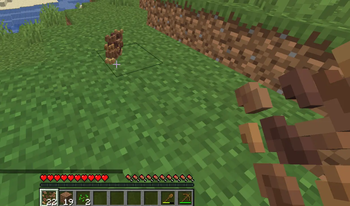
Ever earned a stack of achievements and thought "cool, but what did that actually get me?" This mod gives those achievements a point. Every advancement you complete becomes a dupe token, and you spend those tokens to copy whatever item you're holding.
That's the whole idea. Play the game, unlock things, and cash that progress in for duplicates.
How it works
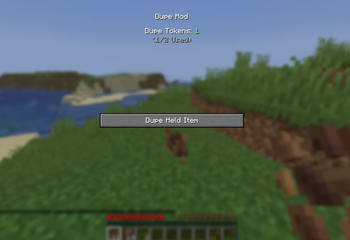
Every completed advancement is worth one token. Hold an item, open the dupe menu, and spend a token to drop a copy of it on the ground. Run out of tokens? Go earn more achievements. It keeps count of how many you've used so you can't spend the same progress twice.
The token count is tracked per player and stays with you, so it works fine on servers as well as singleplayer.
Using it
- Press Right Ctrl to open the dupe menu.
- The menu shows how many tokens you have left, and how many you've used out of your total.
- Hold the item you want in your main hand, click Dupe Held Item, and a copy drops next to you.
The count updates the moment you open the menu, so anything you've unlocked recently is already there. No need to dupe once just to see your real number.
Requirements
- Fabric Loader
- Fabric API
Drop the jar into your mods folder alongside those two and you're good to go.
Versions
There are separate builds for the current 1.21 line and the newer 26.x releases. Grab the file that matches the Minecraft version you're playing on. If you're on any 26.1 or later version, the 26.x build covers you.
Notes
This is a straightforward mod that does one thing. If you run into a bug or have an idea for it, feel free to leave a comment. No promises on a roadmap, but I do read them.
- Edition: Minecraft Java
- File type: .jar
- Minecraft versions listed: 26.1, 26.1.1, 26.1.2
- How to install: Install the matching mod loader (Forge, Fabric or NeoForge) for your Minecraft version. → Download the .jar. → Put it in the .minecraft/mods folder and launch that loader profile.
- Where to get it: Opens on Modrinth — not every file is mirrored on our own servers.
Install steps are the general flow for this file type — How to install Minecraft Java mods & modpacks walks through it step by step.
- Ships as Dupe Mod 26.x.jar — drop this file into the mods folder
- Download size: 26 KB
- Download link checked 16 Sept 2026 — working
These come from our own check of the pack file, not from the source page.