
Disenchant On Anvil
Java mod listed for Minecraft 1.20. Downloads from the MC Java Mods app on Android.
⬇ Download on Modrinth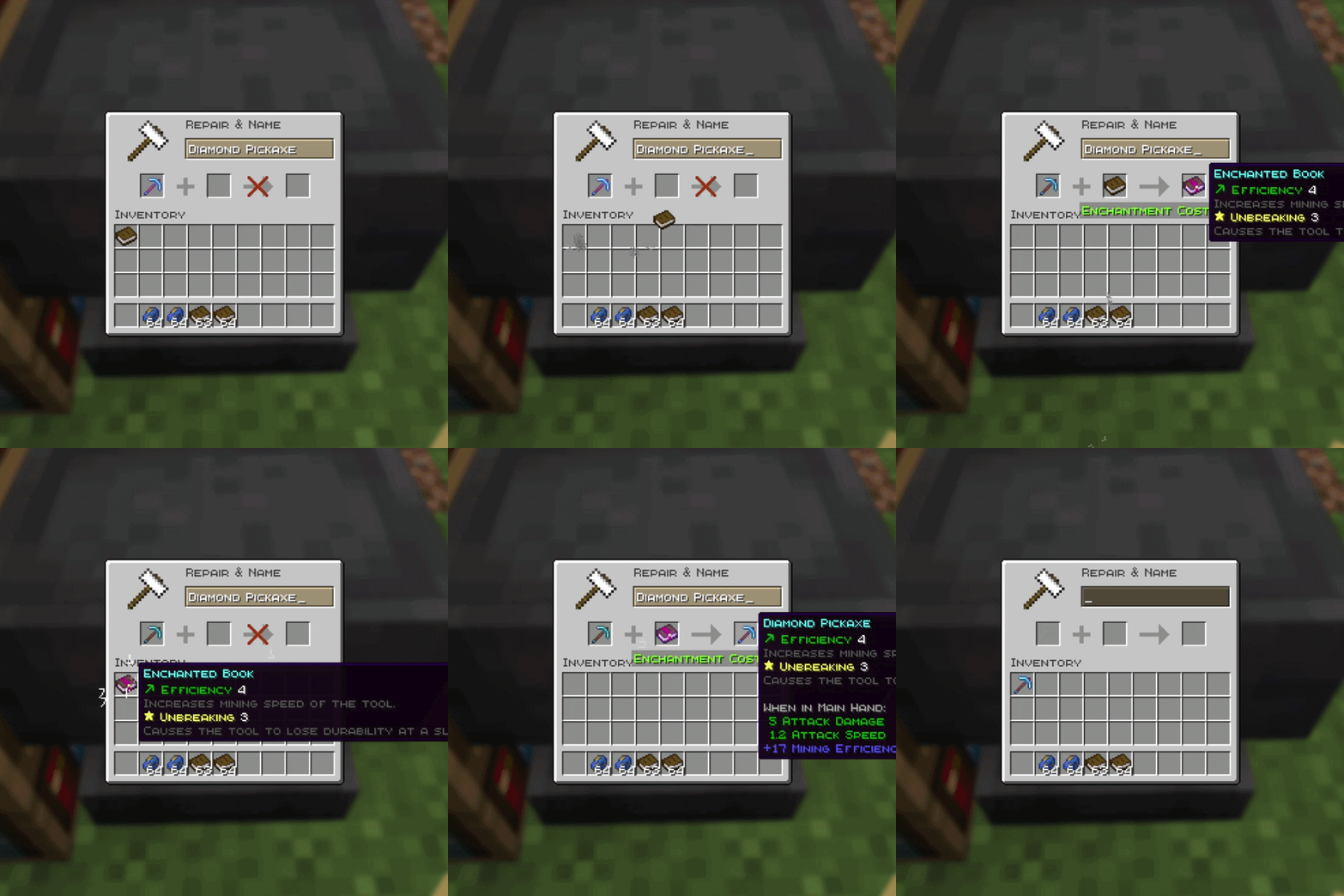
✨ Disenchant Anvil
Disenchant any enchanted item into a reusable enchanted book using an anvil for only 3 experience levels. 📖⚒️
🔮 What does it do?
Disenchant Anvil adds a simple way to remove enchantments from items without destroying them.
Place an enchanted item in the left anvil slot and a normal book in the right slot. For a cost of 3 experience levels, all enchantments are transferred onto an enchanted book.
The original item remains in the anvil without its enchantments, so you can enchant it again or reuse it normally. ♻️
⭐ Features
📚 Transfers all enchantments onto one reusable enchanted book
✨ Supports multiple enchantments at once
☠️ Supports curses
⚔️ Works with tools, weapons, armor, elytra, shields, and other enchantable items
🧩 Supports compatible modded items and enchantments
🟢 Costs exactly 3 experience levels
📖 Consumes only one normal book
♻️ Disenchanted items can be enchanted again
🔨 Uses normal Minecraft anvil compatibility rules
🛠️ How to use:
- Put an enchanted item in the left anvil slot.
- Put a normal book in the right anvil slot.
- Pay 3 experience levels.
- Take the enchanted book.
- Apply the book to another compatible item using an anvil.
Created by SleepyDuck 💤🦆
- Edition: Minecraft Java
- File type: .jar
- Minecraft version listed: 1.20.1
- How to install: Install the matching mod loader (Forge, Fabric or NeoForge) for your Minecraft version. → Download the .jar. → Put it in the .minecraft/mods folder and launch that loader profile.
- Where to get it: Opens on Modrinth — not every file is mirrored on our own servers.
Install steps are the general flow for this file type — How to install Minecraft Java mods & modpacks walks through it step by step.
- Ships as Disenchant-Anvil-1.0.1+mc1.20.1.jar — drop this file into the mods folder
- Download size: 38 KB
- Download link checked 7 Oct 2026 — working
These come from our own check of the pack file, not from the source page.