
Traveler's Backpack Stack Extension
Java mod listed for Minecraft 1.21. Downloads from the MC Java Mods app on Android.
This mod does, when using the ‘Traveller's Backpack’ mod, you can carry more then 64 items in a single slot in your backpack. Simple but very useful.
⬇ Download on Modrinth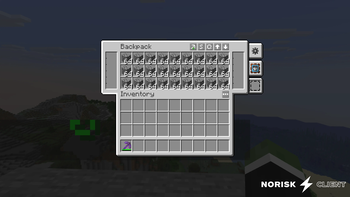
Travelers Backpack Stack Extension
Adds a customisable stack limit to the backpack slots in Traveler's Backpack.
By default, items in the backpack can be stacked in quantities of up to 256 per slot.
This value was chosen to provide a moderate increase and can be adjusted via the configuration file.
A more convenient in-game configuration using Modmenu is planned for future versions.
Why choose this mod?
- More space: Larger stack sizes = more room in your backpack
- Targeted: No effect on normal Minecraft stack limits outside the backpack
- Lightweight: Simple and designed for a single, clear purpose
- Efficient: Perfect for players who want to use their backpack more efficiently
Features
- Increases the stack limit in backpack slots. Default: 256
- Currently adjustable via the configuration file
- No known incompatibilities
- Only the backpack stack limit is changed
Technical Details
| Minecraft | 1.21.1 |
| Modloader | Fabric |
| Traveler's Backpack | Required (1.21.1 version) |
| Stack limit range | 1 to 2,147,483,647 (Max Java Integer) |
| Recommended upper limit | 9,999 (Higher values might clip outside the item slot UI) |
| Platform/API | Client & Server (Required on both) |
Configuration
The setting is located in a simple configuration file.
Path: config/travelers_backpack_stack_extender.json
How to change the stack limit:
- Run the game once with the mod installed. This automatically generates the configuration file.
- Close the game.
- Navigate to your Minecraft installation folder (e.g.,
%appdata%\.minecrafton Windows). - Open the
configfolder and find the file namedtravelers_backpack_stack_extender.json. - Open this file with any standard text editor (like Notepad).
- Change the number to your desired maximum stack size.
Example:
{
  "stackLimit": 256
}
- Edition: Minecraft Java
- File type: .jar
- Minecraft version listed: 1.21.11
- How to install: Install the matching mod loader (Forge, Fabric or NeoForge) for your Minecraft version. → Download the .jar. → Put it in the .minecraft/mods folder and launch that loader profile.
- Where to get it: Opens on Modrinth — not every file is mirrored on our own servers.
Install steps are the general flow for this file type — How to install Minecraft Java mods & modpacks walks through it step by step.
- Ships as travelers_backpack_stack_extender-1.0.4.jar — drop this file into the mods folder
- Download size: 187 KB
- Download link checked 7 Oct 2026 — working
These come from our own check of the pack file, not from the source page.