ResourcepacksJava
Purple Shaded Font
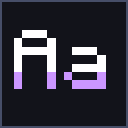
Purple Shaded Font adds a soft purple shade to the bottom of every letter in Minecraft's font, so text gains depth without a single glyph shape changing…
⬇ Download on ModrinthPurple Shaded Font
Purple Shaded Font adds a soft purple shade to the lower part of every character in Minecraft's font. The glyph shapes stay exactly vanilla - only the shading is new - so chat, menus, signs, books and item names get a subtle sense of depth without anything looking out of place.
Features
- Clean purple shading on the vanilla font - no glyph shapes changed
- Shades everything: ASCII, accented letters, the European set and even the enchanting-table alphabet
- Font only: no textures, models or sounds are touched, so it stacks on top of any other resource pack
- Works on Minecraft 1.20 and up
Credit
Inspired by Shaded Font by philliamm - go give the original a look.
Quick facts
- Edition: Minecraft Java
- File type: .zip (resource pack)
- Minecraft versions listed: 1.20, 1.20.1, 1.20.2
- How to install: Download the .zip resource pack — do not unzip it. → Put it in .minecraft/resourcepacks. → Enable it in Options → Resource Packs.
- Where to get it: Opens on Modrinth — not every file is mirrored on our own servers.
Install steps are the general flow for this file type — How to install Minecraft Java resource packs walks through it step by step.
Verified by MCModsHub
- Downloads as Purple Shaded Font.zip
- Download size: 33 KB
- Download link checked 27 Aug 2026 — working
These come from our own check of the pack file, not from the source page.