Classic Armor Style
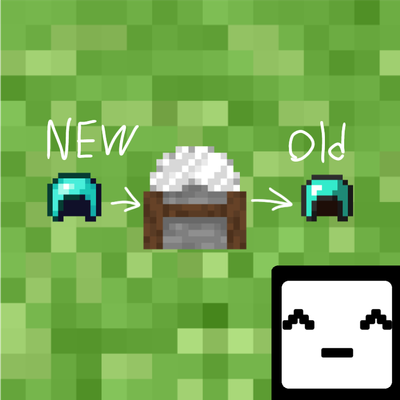
Bring back the classic armor! Convert modern armor to the old pre-1.14 style and back using a stonecutter. Perfect for Minecraft Pocket Edition nostalgia!…
⬇ Download on CurseForge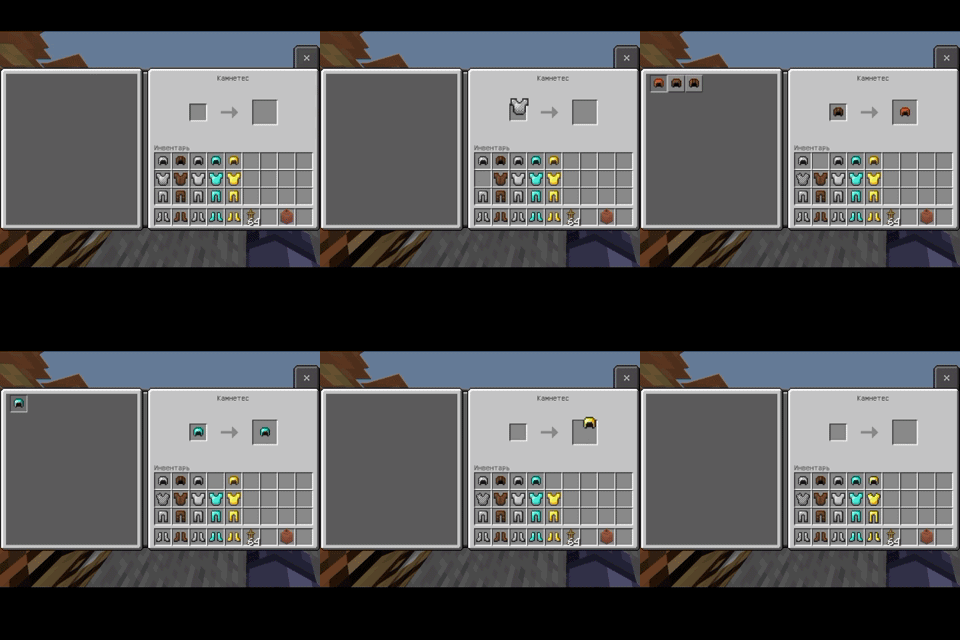
Bring back the classic look of your armor! 🛡️✨
This addon allows you to convert the modern armor designs back to the old, classic style (pre-1.14) that many players know and love.
How it works:
Retro Crafting: Just place any piece of modern vanilla armor into the stonecutter to instantly craft its classic version!
Full Set Support: Works for all main armor types (Diamond, Iron, Gold, etc.).
Two-way Conversion: If you ever want the modern look back, you can easily craft it again using the same method!
Perfect for nostalgia lovers and those who miss the old-school retro vibe of legacy Minecraft Pocket Edition! Compatible with pocket-friendly setups.
- Edition: Minecraft Bedrock
- File type: .mcpack or .mcaddon
- Minecraft versions listed: 1.20.40, 1.21.30, 1.18.2
- How to install: Download the .mcpack or .mcaddon file. → Open it — Minecraft imports it. → In your world: Behavior Packs → Available → Activate, then the same under Resource Packs.
- Where to get it: Opens on CurseForge — not every file is mirrored on our own servers.
Install steps are the general flow for this file type — How to install Minecraft Bedrock addons & mods walks through it step by step.
Classic Armor Style is a free Minecraft Bedrock addon. Compatible with Minecraft 1.20.40, 1.21.30, 1.18.2, 1.21.50 and newer. Downloaded 68 times (via CurseForge). Download it and open it directly in the game.