
Darker UI
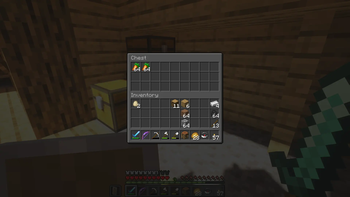
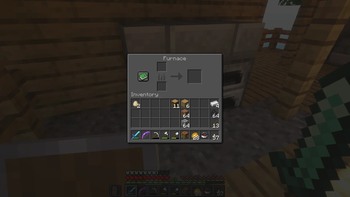
A clean, minimalist resource pack that changes all in-game container and inventory user interfaces to a sleek, dark black theme.
⬇ Download on Modrinth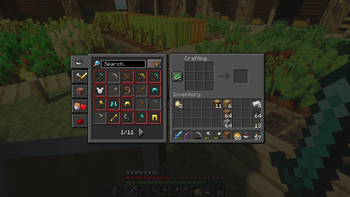
Darker UI
Tired of the bright, classic gray menus blasting your eyes during late-night gaming sessions? Black UI is a lightweight, clean, and vanilla-friendly resource pack that transforms Minecraft's default interface into a sleek, premium dark theme.
Unlike other dark mode packs, this pack only focuses on the in-game containers, leaving your main menu completely untouched!
✨ Features -------------------------------------------------------------------------------
True In-Game Dark Mode: Swaps out the bright gray textures for deep charcoal and solid black layouts.
Perfect Slot Visibility: Grid lines and slot borders are carefully preserved so you can always see exactly where your items are.
Clean & Minimalist: No extra clutter, no forced custom fonts—just the clean vanilla look you love, made easier on the eyes.
Main Menu Untouched: Only modifies menus you open while playing (Inventories, Chests, Crafting Tables, Furnaces, Shulkers, etc.).
🛠️ Installation Guide ---------------------------------------------------------------------
Download the .zip file from the Versions tab.
Open Minecraft and navigate to Options > Resource Packs > Open Pack Folder.
Drop the downloaded .zip file into that folder.
Activate the pack in-game by moving it to the Selected column on the right side.
Click Done and enjoy your new dark theme!
- Edition: Minecraft Java
- File type: .zip (resource pack)
- Minecraft versions listed: 1.21, 1.21.1, 1.21.2
- How to install: Download the .zip resource pack — do not unzip it. → Put it in .minecraft/resourcepacks. → Enable it in Options → Resource Packs.
- Where to get it: Opens on Modrinth — not every file is mirrored on our own servers.
Install steps are the general flow for this file type — How to install Minecraft Java resource packs walks through it step by step.
- Downloads as Darker_UI_rp.zip
- Download size: 7 KB
- Download link checked 28 Aug 2026 — working
These come from our own check of the pack file, not from the source page.