
CoolCrosshair
Java mod listed for Minecraft 1.21. Downloads from the MC Java Mods app on Android.
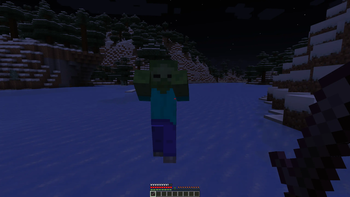
CoolCrosshair adds a fully customizable crosshair to Minecraft. Open the settings menu with the H key (English) to adjust its appearance. Make your HUD…
⬇ Download on Modrinth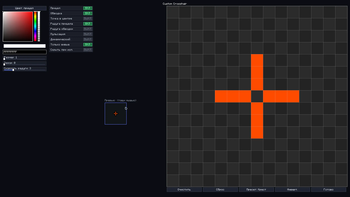
🎉 CoolCrosshair – Make Your Aim Uniquely Yours! 🎉
Tired of the same old crosshair in Minecraft? 🎮 Say goodbye to the default look and hello to total personalization with CustomCrosshair! This mod gives you full control over how your crosshair appears on screen, so you can craft the perfect aiming experience that fits your style and playstyle. 😎
With CustomCrosshair, you’re not stuck with a one‑size‑fits‑all solution. You can tweak tons of visual details: change the color to match your armor or build palette, adjust the size so it’s just right for your resolution, pick the shape that feels most natural, and even fiddle with opacity and outlines to get that crisp, clean look. 🎨✨
And the best part? Getting to the settings is super simple! Just press the H key (English layout) to open the intuitive menu—no digging through config files, no hassle. 🖱️⚡ Whether you’re a PvP pro who needs pixel‑perfect precision or a builder who wants a subtle, unobtrusive marker, this mod has you covered. 🛠️🏗️
CustomCrosshair is lightweight, easy to use, and designed to enhance your gameplay without slowing things down. It’s the perfect touch for players who care about both performance and aesthetics. 📈👁️
Give your Minecraft HUD a fresh new look today—download CustomCrosshair and make every shot (or every block placement) feel just right! 💥🎯
- Edition: Minecraft Java
- File type: .jar
- Minecraft versions listed: 1.21.1, 1.21.2, 1.21.3
- How to install: Install the matching mod loader (Forge, Fabric or NeoForge) for your Minecraft version. → Download the .jar. → Put it in the .minecraft/mods folder and launch that loader profile.
- Where to get it: Opens on Modrinth — not every file is mirrored on our own servers.
Install steps are the general flow for this file type — How to install Minecraft Java mods & modpacks walks through it step by step.
- Ships as CoolCroshair-1.1.jar — drop this file into the mods folder
- Download size: 33 KB
- Download link checked 9 Oct 2026 — working
These come from our own check of the pack file, not from the source page.