
SulfurIndicator
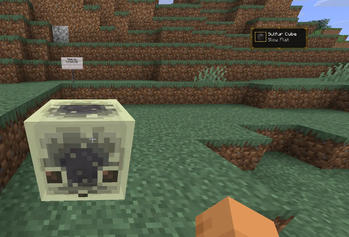
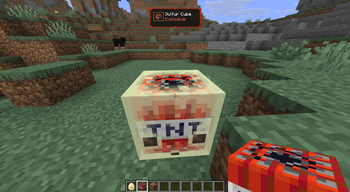
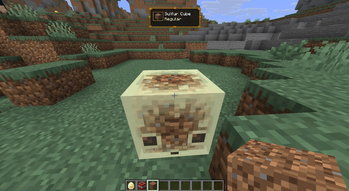
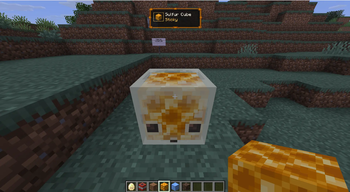
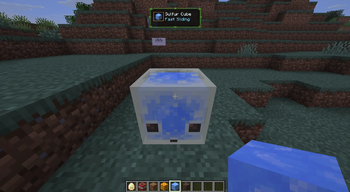
A lightweight client-side Fabric mod that instantly identifies the archetype of Sulfur Cubes with a clean, animated, and customizable HUD.
Features
- Supports all 12 official Sulfur Cube archetypes
- Clean animated HUD with smooth fade and scale transitions
- Unique HUD color theme for every archetype
- Displays the corresponding absorbed block icon
- Highlights dangerous archetypes such as Explosive and Hot
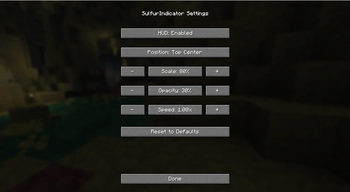
- Fully configurable through Mod Menu
- Adjustable HUD position
- Adjustable HUD scale
- Adjustable HUD opacity
- Adjustable animation speed
- Client-side only — no server installation required
HUD Customization
The HUD can be customized directly from the Mod Menu.
Available options:
- Enable / Disable HUD
- HUD Position
- HUD Scale
- HUD Opacity
- Animation Speed
- Reset to Defaults
All settings are automatically saved and restored when restarting the game.
Supported Archetypes
- Regular
- Bouncy
- Fast Flat
- Fast Sliding
- High Resistance
- Hot
- Light
- Slow Bouncy
- Slow Flat
- Slow Sliding
- Sticky
- Explosive
Requirements
- Fabric Loader
- Fabric API
Optional
- Mod Menu (for the in-game configuration screen)
Multiplayer
SulfurIndicator is client-side only.
It works without installing the mod on the server, making it suitable for both singleplayer and multiplayer.
Source Code
GitHub: https://github.com/CoresCode/SulfurIndicator
If you encounter a bug or have a feature suggestion, feel free to open an issue on GitHub.
- Edition: Minecraft Java
- File type: .jar
- Minecraft version listed: 26.2
- How to install: Install the matching mod loader (Forge, Fabric or NeoForge) for your Minecraft version. → Download the .jar. → Put it in the .minecraft/mods folder and launch that loader profile.
- Where to get it: Opens on Modrinth — not every file is mirrored on our own servers.
Install steps are the general flow for this file type — How to install Minecraft Java mods & modpacks walks through it step by step.
- Ships as sulfurindicator-1.0.0.jar — drop this file into the mods folder
- Download size: 125 KB
- Download link checked 29 Aug 2026 — working
These come from our own check of the pack file, not from the source page.