HomeJavaModsViper Private Chests
Viper Private Chests
ModsJava

Viper Private Chests

by TOP_G2026 · on Modrinth

A server-side container protection mod for Fabric that locks blocks via standard [private] or [public] wall signs, utilizing packet-level correction to…

⬇ Download on Modrinth
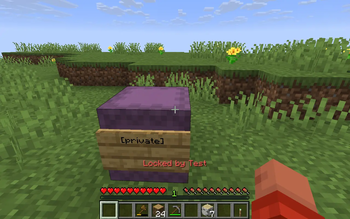
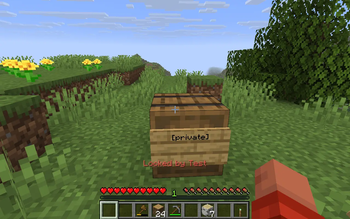
Viper Private Chests — screenshot 1Viper Private Chests — screenshot 2

Viper Private Chests

Server-side container protection for Minecraft Fabric protects chests, barrels, shulkers, and more using vanilla signs. Zero client-side mods required. Works with Geyser/Floodgate Bedrock players.


Features

Enhance your server setup! Check out my other server-side mods over at : Fabric Server Essentials


Commands

Player Commands (/pchests)

Command Description
/pchests trust add <player> Add a player to your global trusted list
/pchests trust remove <player> Remove a player from your trusted list
/pchests trust list View your trusted friends
/pchests autolock Toggle auto-lock mode

Admin Commands (/private_chests) [OP Level 3+]

Command Description
/private_chests list [private/public] Open interactive admin GUI showing all protected containers
/private_chests list_in_area <radius> [private/public] List locks within a radius
/private_chests info <x> <y> <z> View lock details + 25-entry audit log
/private_chests unlock <x> <y> <z> Force-remove a lock
/private_chests cleanup Purge stale/orphaned lock records

How To Use

Locking a Container

  1. Place a container (chest, barrel, shulker box, etc.)
  2. Place a wall sign on the container
  3. Write [private] on line 1
  4. (Optional) Lines 24: player names, team:TeamName, or [trusted]
  5. Done! The container is now locked to you.

Sign Modifiers

Line Content Effect
[private] Standard private lock (only you + whitelisted players)
[public] Open to everyone
[deposit] Public drop-box (insert only)
[display] Public read-only showcase
[trusted] Check global /pchests trust list for access
[redstone] Allow comparators to read inventory
[hopper] Allow hopper interaction
team:<name> Allow all members of a scoreboard team

Configuration

File: config/private-chests.json

{
  "floodgatePrefix": ".",
  "adminPermissionLevel": 3,
  "maxLocksPerPlayer": 0,
  "listMaxEntries": 50,
  "listPreviewEntries": 20,
  "disableProtectionIfOwnerBanned": true,
  "enableClaimDecay": true,
  "daysBeforeClaimDecay": 30,
  "inspectionItem": "minecraft:feather",
  "enableSoundFeedback": true,
  "enableActionBarAlerts": true,
  "maxHistoryLogEntries": 25,
  "allowIntruderRedstonePulse": true
}

Installation

  1. Install Fabric Loader 0.19.3+ and Fabric API
  2. Download the jar for your Minecraft version
  3. Place in your mods/ folder
  4. Restart the server

Compatible with Geyser/Floodgate Bedrock players are fully supported without any client-side mods.


Supported Versions

Minecraft Branch Java
1.21-1.21.11 viper-private-chests-1.21.x 21+
26.1-26.1.2 viper-private-chests-26.1.x 25+
26.2 viper-private-chests-26.2.x 25+
Quick facts

Install steps are the general flow for this file type — How to install Minecraft Java mods & modpacks walks through it step by step.

Verified by MCModsHub

These come from our own check of the pack file, not from the source page.

Explore more