HomeJavaModsViper Economy
Viper Economy
ModsJava

Viper Economy

by TOP_G2026 · on Modrinth

A server-side Fabric economy mod featuring dynamic virtual or physical currency toggles, multi-database drivers, cross-server Redis syncing, and…

Which Minecraft do you have?

Every version of the game needs its own build. Pick yours, then download — the wrong build installs fine and then does nothing in the game. This mod is built for Fabric only.

⬇ Download for 26.2⬇ Download for 26.1–26.1.2⬇ Download for 1.21–1.21.11
I don't know my version or loader
Open the Minecraft launcher and look at the profile you play on — it names both, like fabric-loader-1.21.4. The version also shows in the bottom-right corner of the game's main menu.
No loader in the profile name? Then it's plain Minecraft, and these mods won't run — you need Fabric or NeoForge installed first.
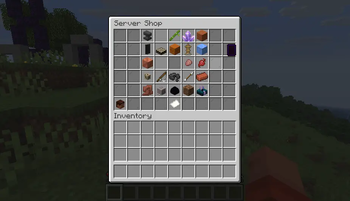
Viper Economy — screenshot 1

Viper Economy (1.21.x 26.x)


What Is Viper Economy?

Viper Economy is a server-side only Fabric economy mod that adds a complete virtual and physical currency system to Minecraft. Unlike clunky permission-based economy plugins, Viper Economy hooks directly into Minecraft's server internals via Fabric Mixins delivering atomic transactions, server shop GUIs, chest shops, daily rewards, tax mechanics, PvP balance loss, and scoreboard integration with zero client mods required.

Key differentiator: Vanilla clients connect normally. No resource packs, no client-side mods, no version mismatch errors. Drop the JAR in mods/ and go.


Core Economy Engine

Dual Currency Modes

Mode Name Behavior Best For
VIRTUAL Digital Balance Balances stored in JSON files /bal, /pay, /baltop General survival, minigame servers
PHYSICAL Item Currency Balances = items in inventory/ender chest (default: diamond) Hardcore, roleplay, anarchy

How It Works (Simplified)

Player Joins  Starting Balance Assigned  Daily Reward Check
                                                       
              
                Virtual Mode: storage.json    /pay  /bal       
                Physical Mode: count items    /topup /withdraw 
              
                                                       
              Server Shop (/servershop)  Buy/Sell  Tax Applied
              Chest Shops  Sign + Chest  Auto-Detected
              PvP Death  Balance Loss %  Winner Gets Drop

Features

Feature Description
Dual Currency VIRTUAL (digital) or PHYSICAL (item-based) economy modes
Server Shop GUI Paginated category shop with item lore, shift-click stacks, buy/sell
Chest Shops Sign-on-chest shops with auto-detection, buy/sell pricing, ownership protection
Chest Protection Non-owners cannot open shop chests admin shift-click bypass
Daily Rewards Configurable daily login bonus (UTC reset)
Daily Sell Limit Per-player daily sell cap to prevent inflation
Purchase Tax Automatic tax rate on server shop purchases (default 10%)
PvP Economics Optional % of victim's balance dropped on PvP death
Scoreboard Real-time balance display on sidebar (toggleable)
Hot-Reload Edit configs and run no restart needed
Permissions Op-level based permission system

Enhance your server setup! Check out my other server-side mods over at : Fabric Server Essentials


Commands

Player Commands

Command Description
/bal [player] Check your balance or another player's
/pay <player> <amount> Transfer money to another player
/baltop View top 10 balances leaderboard
/withdraw <amount> Withdraw physical currency from balance (physical mode)
/topup <amount> Deposit physical currency items into balance (physical mode)
/worth Check buy/sell price of your held item
/buy <item> [amount] Buy items from the server shop
/sell <item> [amount] Sell items to the server shop
/servershop Open the server shop GUI

Admin Commands (op only)

Command Description
/givemoney <player> <amount> Give money to a player
/takemoney <player> <amount> Take money from a player
/setmoney <player> <amount> Set a player's exact balance
/resetmoney <player> Reset a player's balance to starting amount
/ecolog View economy configuration info

Configuration

All configs live in config/viper-economy/ and are hot-reloadable.

config.json

{
  "economyMode": "VIRTUAL",
  "physicalCurrencyItem": "minecraft:diamond",
  "startingBalance": 1000.0,
  "dailyAmount": 100.0,
  "dailySellLimit": 10000.0,
  "taxRate": 0.1,
  "pvpBalanceLossPercentage": 0.0,
  "serverShopEnabled": true
}
Field Description
economyMode VIRTUAL (balances in storage) or PHYSICAL (currency items)
physicalCurrencyItem Item ID used as currency when PHYSICAL mode active
startingBalance Balance given to new players on first join
dailyAmount Free money granted on first join each UTC day
dailySellLimit Max total sell value per player per day
taxRate Fraction (0.01.0) taxed on server shop purchases
pvpBalanceLossPercentage % of victim's balance dropped on PvP death
serverShopEnabled Enable /servershop GUI

prices.json

Defines all purchasable/sellable items organized by category:

{
  "items": {
    "minecraft:diamond": {
      "category": "gems",
      "stack": 64,
      "unit_buy": 100.0,
      "unit_sell": 50.0
    }
  },
  "categories": {
    "gems": {
      "name": "6Gems",
      "display_item": "minecraft:diamond"
    }
  }
}

A massive default prices.json (671 KB, 500+ items across 25+ categories) is bundled and auto-deployed on first run.


Usage Walkthrough

1. First Run (Auto-Setup):

2. Virtual Economy (Default):

3. Chest Shops (Player-Run):

  1. Place a chest
  2. Place a sign on it
  3. Line 1: [Shop] (auto-detected)
  4. Line 2: B 10 (buy price) or S 5 (sell price) or B 10 S 5
  5. Line 3: Item name or ? (auto-detect from chest)
  6. Line 4: Optional owner name (defaults to placer)
  7. Fill chest with stock players interact with sign to buy/sell

4. Physical Economy (Hardcore/Roleplay):

5. PvP Server Economy:


Performance


Installation

Requirements

Steps

  1. Download the correct JAR for your Minecraft version
  2. Place in mods/ folder (server only client not required)
  3. Start server once configs auto-generate
  4. Edit config/viper-economy/config.json to your liking
  5. Edit config/viper-economy/prices.json to customize shop prices
  6. Changes apply instantly no restart needed

FAQ

Q: Do players need to install anything?
A: No. Viper Economy is 100% server-side. Vanilla clients connect normally.

Q: How do I reset a player's balance?
A: /resetmoney <player> resets to the starting balance from config.

Q: Can I use custom items as currency?
A: Yes. Set physicalCurrencyItem to any valid item ID in config.json.

Q: How do I add new items to the shop?
A: Edit prices.json and add entries under items and categories. Changes apply instantly.

Q: What happens if the server crashes?
A: JSON storage uses atomic writes partial writes are discarded, last save is preserved.


Supported Versions

Version Java Status
1.21.x (1.21 1.21.11) 21 Full support
26.1.x (26.1 26.1.2) 25 Full support
26.2.x 25 Full support

Built with Fabric Loom 1.17.x Zero external dependencies ARR Licensed

Quick facts

Install steps are the general flow for this file type — How to install Minecraft Java mods & modpacks walks through it step by step.

Verified by MCModsHub

These come from our own check of the pack file, not from the source page.

Explore more