
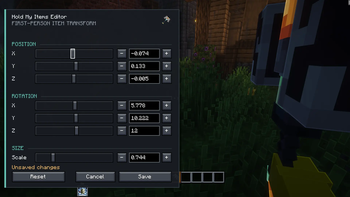

HMI Reforged Editor
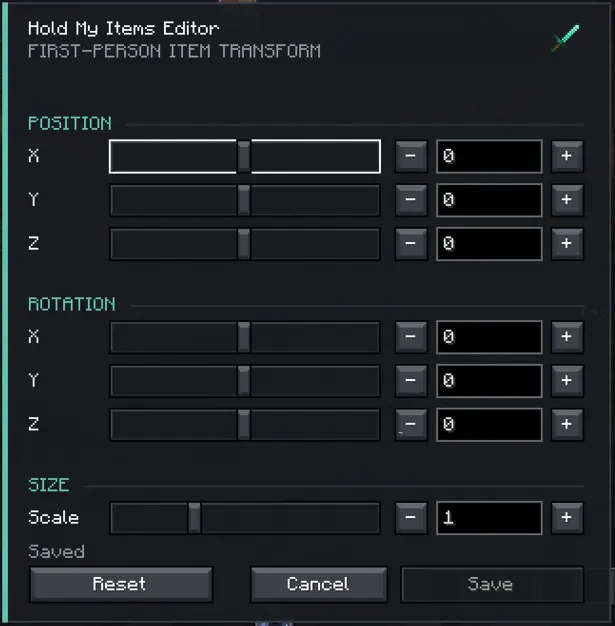
HMI Reforged Editor adds an in-game editor for the first-person hand and item positions used by HMI Reforged.
- Adjust the held item’s position on the X, Y, and Z axes.
- Change its rotation and scale.
- Preview every adjustment directly in-game and in real time.
- Reset unwanted changes to their default values.
- Save the final settings without manually editing configuration files.
This mod makes HMI Reforged easier to customize. Players can quickly create a comfortable first-person view, fix item positions that do not suit their screen. Requires HMI Reforged to provide the effects being configured.
Source code is available on github for anyone that would want to keep it updated, it's very likely that i won't update. Thanks to Tree Corp for HMI and thanks to bene_2212 for the port
Quick facts
- Edition: Minecraft Java
- File type: .jar
- Minecraft version listed: 1.21.1
- How to install: Install the matching mod loader (Forge, Fabric or NeoForge) for your Minecraft version. → Download the .jar. → Put it in the .minecraft/mods folder and launch that loader profile.
- Where to get it: Opens on Modrinth — not every file is mirrored on our own servers.
Install steps are the general flow for this file type — How to install Minecraft Java mods & modpacks walks through it step by step.
Verified by MCModsHub
- Ships as hmieditor-2.0.1.jar — drop this file into the mods folder
- Download size: 27 KB
- Download link checked 28 Aug 2026 — working
These come from our own check of the pack file, not from the source page.