
Kairo's Totem Customizer
Java mod listed for Minecraft 26.x. Downloads from the MC Java Mods app on Android.
I don't know my version or loader
Kairo's Totem Customizer
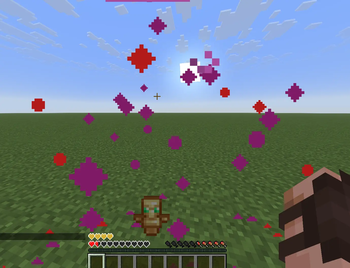
Customize every visual aspect of the Totem of Undying.
Move it, resize it, recolor it, or hide it entirely. Everything is 100% client-side and render only.
Features
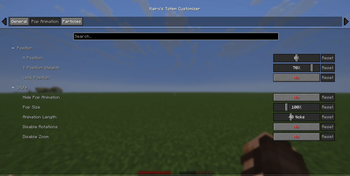
Pop Animation
- Move the pop animation anywhere on your screen with X/Y sliders.
- Lock the position to remove the random wobble, so it pops in the exact same spot every time.
- Resize it from 25%–300%.
- Adjust animation duration.
- Disable the spin animation.
- Disable the zoom animation.
- Hide the pop animation completely.
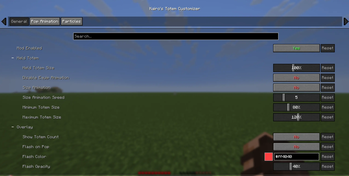
Held Totem
- Resize the totem in your main hand or offhand (first person) to keep it out of your view.
- Disable the equip animation when you swap a totem in.
- Optional size animation that makes the held totem smoothly pulse, with adjustable speed, minimum, and maximum size.
Overlay
- Show your totem count under the crosshair.
- Flash a color over the screen when your totem pops, with a custom color and opacity.
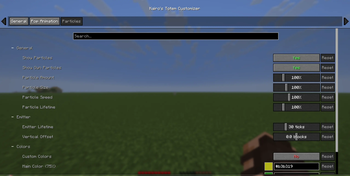
Particles
- Adjust particle amount (0%–500%).
- Change particle size, speed, and lifetime.
- Control how long the pop keeps spawning particles, and move the spawn point up or down.
- Customize two particle colors with a click-to-open color picker.
- Optional fade color for smooth color transitions.
- Disable your own totem particles while still seeing other players' particles.
Settings
Open the configuration through Mod Menu, or bind the Open Totem Settings key in Options → Controls.
Three organized tabs (General, Pop Animation, Particles) with grouped sections. Every setting includes a tooltip and can be reset individually, and every color setting has a pop-up color picker.
Requirements
- Fabric Loader
- Fabric API
- Cloth Config
- Edition: Minecraft Java
- File type: .jar
- Minecraft versions listed: 26.1, 26.1.1, 26.1.2
- How to install: Install the matching mod loader (Forge, Fabric or NeoForge) for your Minecraft version. → Download the .jar. → Put it in the .minecraft/mods folder and launch that loader profile.
- Where to get it: Opens on Modrinth — not every file is mirrored on our own servers.
Install steps are the general flow for this file type — How to install Minecraft Java mods & modpacks walks through it step by step.
- Ships as KairosTotemCustomizer-2.11.0+26.1-26.1.2.jar — drop this file into the mods folder
- Download size: 155 KB
- Download link checked 11 Oct 2026 — working
These come from our own check of the pack file, not from the source page.