
ModsJava
Starter Cabin
Starter Cabin is a Minecraft mod that lets you save a player-built structure and automatically place it near the spawn point of any new world.
⬇ Download on Modrinth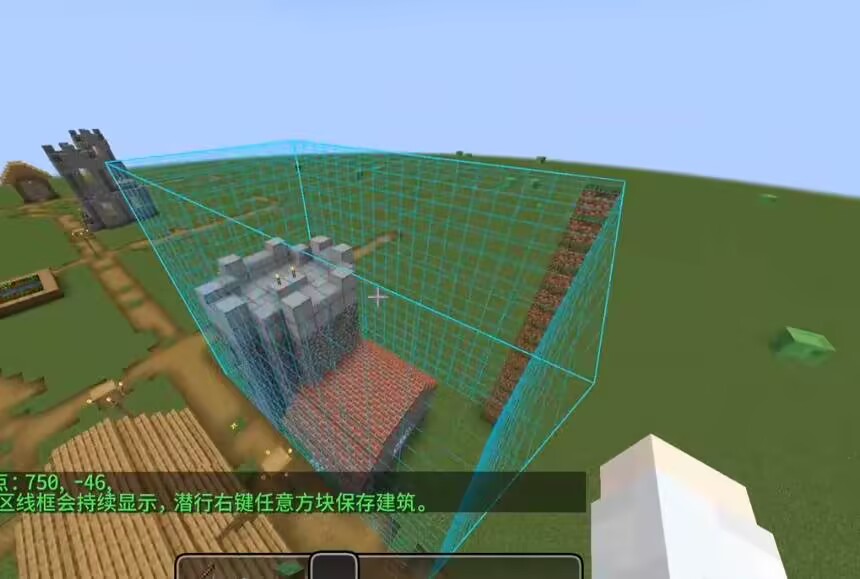
How to use it in 4 s
teps
- 1.Build your structure, then place a Spawn Carpet inside it where you want players to appear.
- 2.Hold the Building Saver item, right‑click one corner of the building, then right‑click the opposite corner – a selection outline appears.
- 3.Sneak + right‑click any block to save the selected area as a template.
- 4.When you create a new world, the mod will automatically find a suitable flat spot near spawn, place your building, and set the world spawn to the carpet position.
Key items
Building Saver – a carrot‑on‑a‑stick styled tool for selecting and saving.
Spawn Carpet – a marker block that records the spawn point; it is removed after saving (configurable).
Notes
- The template is saved to config/starter_cabin/template.nbt
- Each world generates the building only once – delete world data to force regeneration.
- If placement looks off, increase placementSearchRadius or lower maxSurfaceVariation.
- Recommended workflow
- Build and save your structure in a test world.
- Create a new world to verify the generation.
- Tweak config values if needed, then re‑save the template after major changes.
Quick facts
- Edition: Minecraft Java
- File type: .jar
- Minecraft version listed: 1.21.1
- How to install: Install the matching mod loader (Forge, Fabric or NeoForge) for your Minecraft version. → Download the .jar. → Put it in the .minecraft/mods folder and launch that loader profile.
- Where to get it: Opens on Modrinth — not every file is mirrored on our own servers.
Install steps are the general flow for this file type — How to install Minecraft Java mods & modpacks walks through it step by step.
Verified by MCModsHub
- Ships as starter_cabin-1.0.1.jar — drop this file into the mods folder
- Download size: 37 KB
- Download link checked 30 Aug 2026 — working
These come from our own check of the pack file, not from the source page.