
Fake VapeV4
a mod that ads a purely cosmetic fake HUD from the popular cheat VAPE V4, you can add custom modules, change color, change sorting. to start do /fakevape
⬇ Download on Modrinth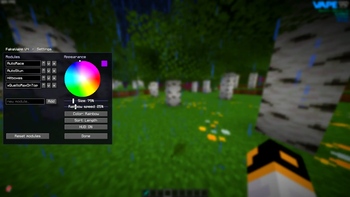



FakeVape V4
A purely cosmetic HUD overlay for Minecraft that makes your screen look like it's running a cheating client without doing literally anything!
Ever though "Wow Vape V4 is a clean GUI but i don't wanna cheat" or "Yes i wanna fake cheating to my friends". No? too bad now it exist, a fully remake of the Sort GUI of the famous VAPE V4 Client
THIS MOD IS 100% COSMETIC.
FakeVape V4 is NOT a cheat, hacked client, or utility mod. It provides ZERO gameplay functionality. The "modules" are just editable colored text labels none of them do anything. No flight, no reach, no auto-anything. The mod only paints decorative text on your HUD that resembles a client overlay. If you're looking for an actual cheat, this is not it (and that's the point).
Features
- Fully fake module list: Add, rename, and delete any "module" names you want. They're just labels. None of them have any effect on the game.
- Recolorable "VAPE" logo: Features a "V4" badge, rendered top-right and tinted to any color you pick.
- Color wheel + brightness slider: Allows for precise solid colors.
- Rainbow mode: The logo cycles through a single animated hue, and the module list flows with an animated top-to-bottom rainbow gradient. Adjustable animation speed.
- Sorting options: Keep your own manual order, or auto-sort alphabetically (A–Z / Z–A) or by length.
- Clean styling: Right-aligned module names with a subtle drop shadow, designed to mimic the real look.
- Global ON/OFF switch: Toggle the entire overlay instantly.
- In-game config GUI: Open it with a command or a bindable keybind.
How to Use
- Install Fabric Loader + Fabric API, then drop FakeVape V4 into your mods folder.
- Launch the game and run the config command (or bind a key) to open the GUI.
- Add, rename, or delete fake module names to taste.
- Pick a color from the wheel, or flip on Rainbow mode and set the speed.
- Choose your sorting (manual or auto), then flip the global switch ON.
- Enjoy your purely-for-show HUD.
Open the config GUI anytime with:
/fakevape
Use Cases
- Recording skits or trolling friends (it looks real, it isn't)
- Eye-catching video thumbnails
- Themed stream/recording overlays
- A clean, customizable on-screen watermark
- …all completely fake, purely for looks.
Compatibility
- Minecraft: 26.1.2
- Mod Loader: Fabric (requires Fabric API)
- Java: 25
- Side: Client-side only — safe to use without it being on a server.
FakeVape V4 is a cosmetic novelty mod. It does not modify gameplay in any way and it does not condone cheating or vaping ;)
- Edition: Minecraft Java
- File type: .jar
- Minecraft version listed: 26.1.2
- How to install: Install the matching mod loader (Forge, Fabric or NeoForge) for your Minecraft version. → Download the .jar. → Put it in the .minecraft/mods folder and launch that loader profile.
- Where to get it: Opens on Modrinth — not every file is mirrored on our own servers.
Install steps are the general flow for this file type — How to install Minecraft Java mods & modpacks walks through it step by step.
- Ships as fakevape-26.1.2-1.2.0.jar — drop this file into the mods folder
- Download size: 86 KB
- Download link checked 31 Aug 2026 — working
These come from our own check of the pack file, not from the source page.