
Searchify
Java mod listed for Minecraft 26.x. Downloads from the MC Java Mods app on Android.
⬇ Download on Modrinth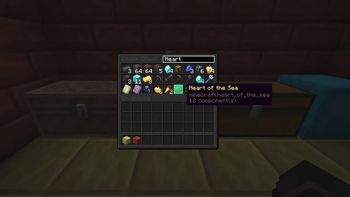
Searchify
Search your chests instead of squinting at them.
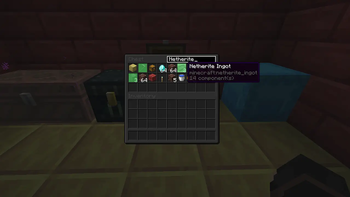
Searchify adds a simple search box to the top of every chest-like container. Type an item name, and any matching slot in that container lights up green — no more digging through 54 slots of cobblestone looking for the one stack of glow berries you know is in there somewhere.
Features
- 🔍 A clean "Search" box built right into the container UI, styled to match vanilla's own -fonts and colors
- 🟢 Matching item slots highlight instantly as you type
- 📦 Works on every chest-like container:
- Chests (single & double)
- Ender chests
- Barrels
- Shulker boxes (any color)
- Copper chests — every oxidation stage, waxed or not
- Chest boats
- Minecarts with chests
🎯 Only highlights matches inside the container you're actually looking at — your own inventory below is left alone. 🪶 Lightweight, client-side only — no server install needed, no gameplay changes, just a UI convenience.
How it works
Open any supported container, click the search box in the top-right corner, and start typing. Slots holding a matching item glow green. Clear the box or close the container and it resets.
Requirements
- Minecraft 26.2
- Fabric Loader
- Fabric API
Installation
- Install Fabric Loader for Minecraft 26.2.
- Download and install Fabric API.
- Download Searchify and drop it in your mods folder.
- Launch and open a chest.
Since Searchify is client-side only, it's safe to add to any server without needing it installed server-side — though other players on the server won't see your highlights (they're local to your client).
- Edition: Minecraft Java
- File type: .jar
- Minecraft version listed: 26.2
- How to install: Install the matching mod loader (Forge, Fabric or NeoForge) for your Minecraft version. → Download the .jar. → Put it in the .minecraft/mods folder and launch that loader profile.
- Where to get it: Opens on Modrinth — not every file is mirrored on our own servers.
Install steps are the general flow for this file type — How to install Minecraft Java mods & modpacks walks through it step by step.
- Ships as searchify-1.0.0.jar — drop this file into the mods folder
- Download size: 6 KB
- Download link checked 11 Oct 2026 — working
These come from our own check of the pack file, not from the source page.