

Brings the vanilla Minecraft F3 + F4 gamemode switcher to older Minecraft versions.
A lightweight, client-side Minecraft Forge mod that faithfully ports the familiar F3 + F4 Gamemode Switcher from Minecraft Java Edition 1.16.5 to older Minecraft versions.
It recreates the original interface, controls, gamemode order, quick-switch behavior and vanilla visual style without adding unrelated cheat menus or gameplay features.
Overview
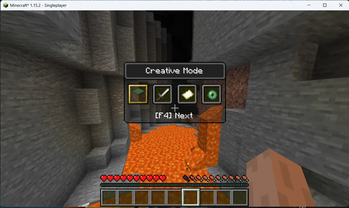
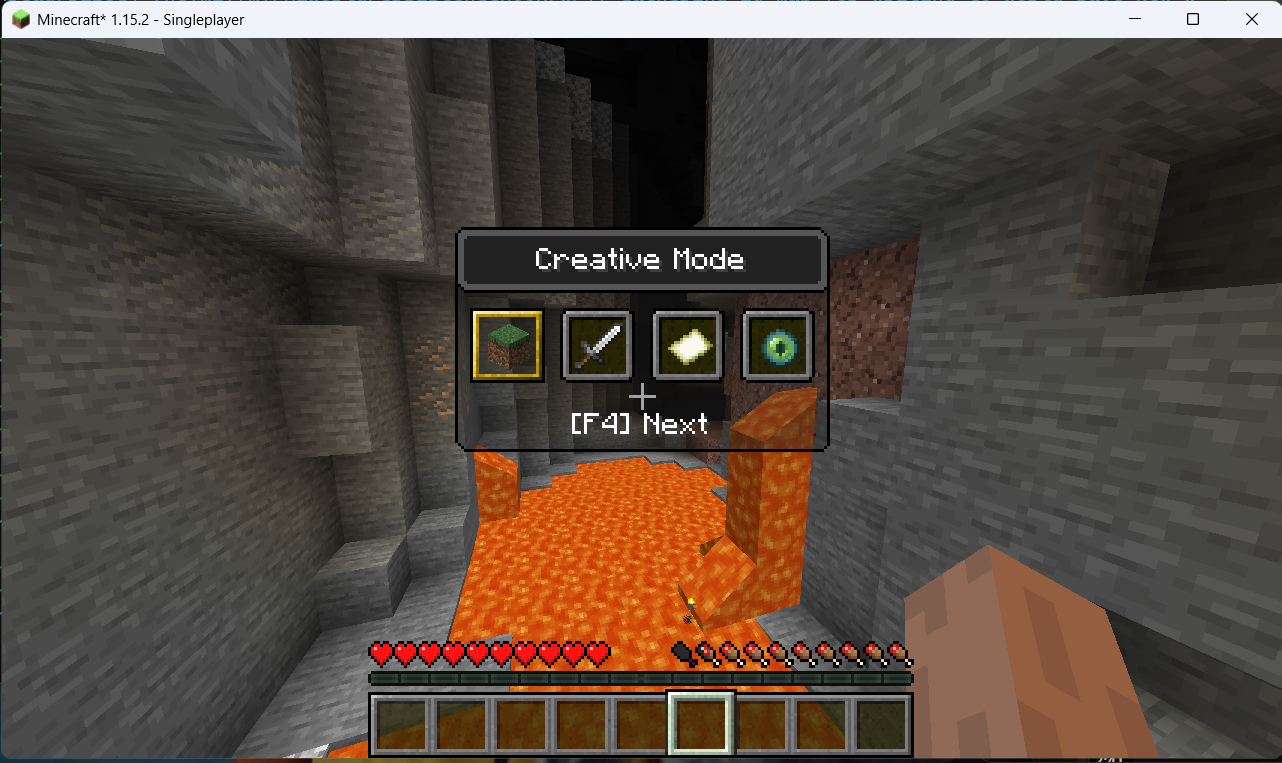
Hold F3 and press F4 to open the vanilla-style gamemode selector.
The vanilla order is preserved:
Creative → Survival → Adventure → Spectator → Creative
The world remains visible behind the selector, and the interface automatically adapts to the current Minecraft GUI Scale.
Features
- Faithful port of the Minecraft 1.16.5 F3 + F4 selector
- Vanilla interface, slots, icons, text and hover behavior
- Original vanilla gamemode switcher texture
- Original Minecraft item renderer for gamemode icons
- Quick switching between the two most recently used gamemodes
- Correct one-step cycling for every individual key press
- Keyboard and mouse selection
- Optional local vanilla permission check
- Optional pause behavior
- Client-side installation
- No additional dependencies
- No server-side installation required
The selector uses the vanilla resource:
textures/gui/container/gamemode_switcher.png
No custom or modernized replacement interface is used.
Controls
- Hold F3.
- Press F4 to open the Gamemode Switcher.
- Continue holding F3 and press F4 again to cycle through the available gamemodes.
- Release F3 to apply the selected gamemode.
Holding F4 continuously does not rapidly cycle through every option. Each distinct F4 press is processed only once.
Press Escape to close the selector without applying the selected change.
Gamemodes can also be selected using the mouse.
Quick Switching
The first F3 + F4 press highlights the alternate gamemode used previously instead of selecting the gamemode that is already active.
This allows fast switching between your two most recently used gamemodes.
Examples:
- Creative → Survival
- Survival → Creative
- Spectator → Creative
- Creative → Spectator
When you manually select a different gamemode, the gamemode you just left becomes the new previous gamemode.
If the selected gamemode is already active, the selector closes without sending an unnecessary change request.
Improved F3 Handling
Older Minecraft versions may process F3 before detecting the F3 + F4 combination, causing the debug screen to briefly appear.
The mod uses a short grace period of approximately 150 milliseconds to distinguish between:
- F3 by itself
- F3 combined with the configured activation key
If the activation key is pressed during this period, the normal F3 action is consumed and the selector opens without visible debug-screen flicker.
F3 by itself continues to control the normal Minecraft debug screen.
Configuration
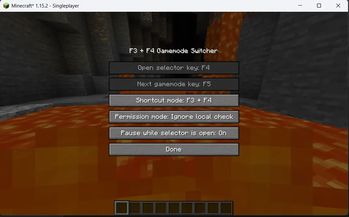
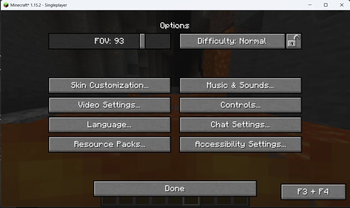
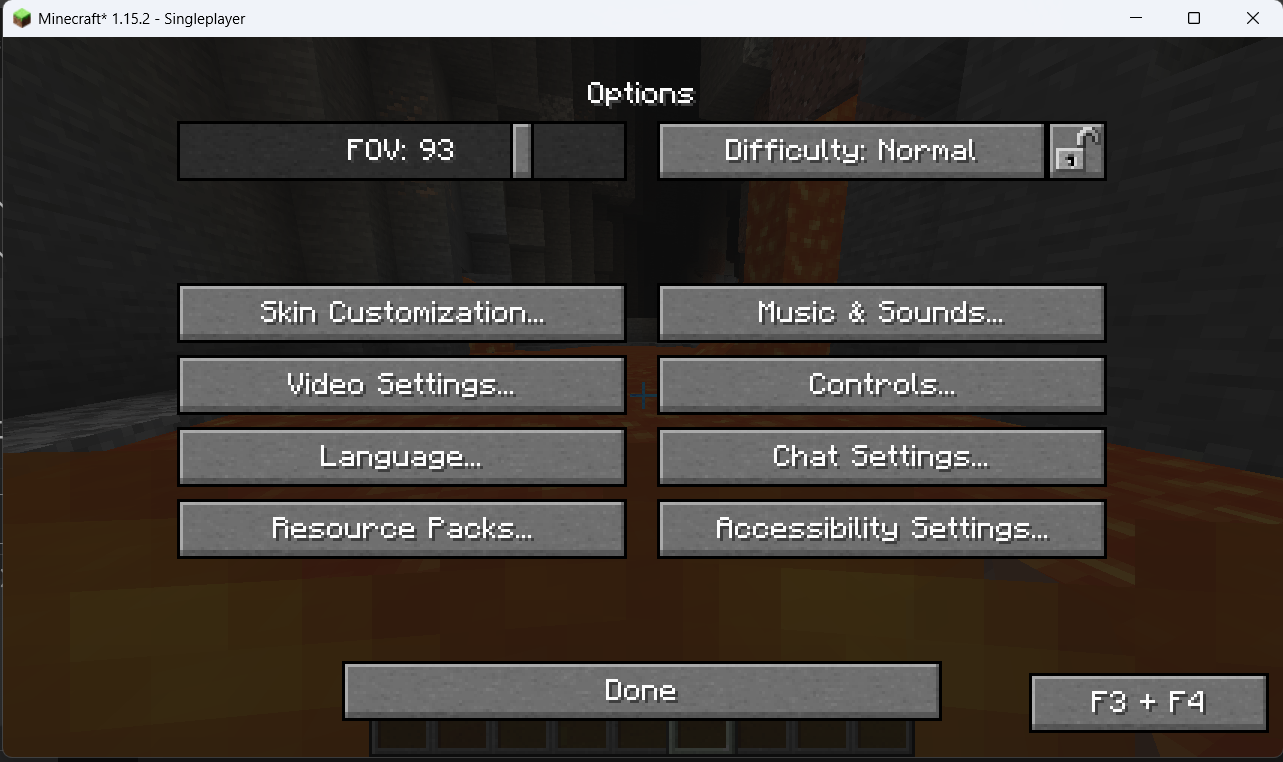
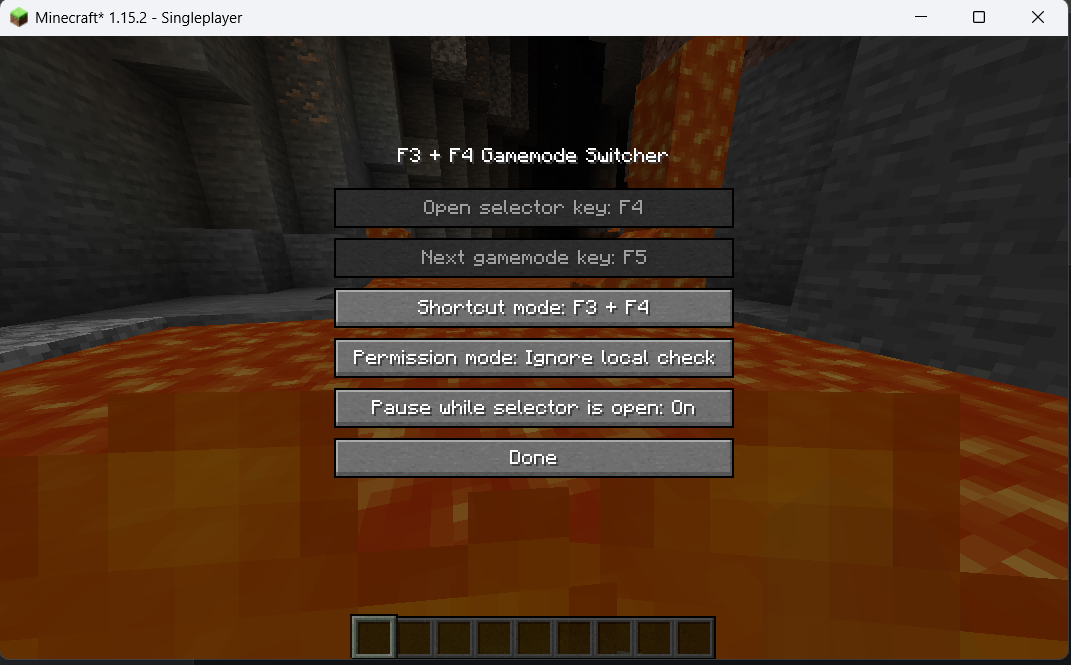
The mod includes an options screen with the following settings:
Activation Key
Choose the key used to open and cycle the selector.
Examples:
- F4
- K
- Any other supported keyboard key
Activation Mode
Choose how the selector is opened:
- F3 + configured key
- Configured key only
Vanilla Permission Check
Controls whether the client performs the normal local vanilla permission check before opening the selector.
Disabling this option does not bypass server permissions.
Pause Game
Choose whether the game should pause while the selector is open.
Default Settings
- Activation key: F4
- Activation mode: F3 + F4
- Vanilla permission check: Enabled
- Pause game: Disabled
Permission Behavior
This mod does not bypass Minecraft or server permissions.
In multiplayer, the mod uses Minecraft's normal gamemode-changing mechanism. The server has final control and can accept or reject the request normally.
The Ignore local check option only allows the selector to open when the client-side check would otherwise block it. It does not grant permission to change gamemode and does not bypass server security.
In singleplayer, the mod follows the normal rules of the integrated server. Cheats or sufficient permissions are still required.
Multiplayer Compatibility
The mod is client-side and normally does not need to be installed on the server.
It works on multiplayer servers where the player already has permission to change gamemode.
Possible conflicts may occur with mods that modify:
- F3 or F4 keyboard handling
- The debug screen
- Gamemode commands
- Keyboard input events
- Minecraft GUI rendering
- Player controller behavior
Project's Goal
This project started from a simple personal need.
While playing older Minecraft versions, I wanted to use the familiar F3 + F4 Gamemode Switcher available in newer releases. I searched for a mod that faithfully brought this feature to older Forge versions, but I could not find one that worked exactly the way I wanted.
At first, I decided to create the mod only for myself. My goal was to reproduce the vanilla Minecraft 1.16.5 selector as closely as possible, including its interface, controls, quick-switch behavior and gamemode cycling.
After getting it working, I realized that other players, modpack creators, developers and server administrators might be looking for the same feature. Instead of keeping it as a private project, I decided to publish it so that anyone using older Minecraft versions could enjoy the same convenient vanilla gamemode switcher.
The project remains focused on one purpose: bringing the original F3 + F4 Gamemode Switcher experience to older Minecraft Forge versions in a lightweight and faithful way.
- Edition: Minecraft Java
- File type: .jar
- Minecraft version listed: 1.15
- How to install: Install the matching mod loader (Forge, Fabric or NeoForge) for your Minecraft version. → Download the .jar. → Put it in the .minecraft/mods folder and launch that loader profile.
- Where to get it: Opens on Modrinth — not every file is mirrored on our own servers.
Install steps are the general flow for this file type — How to install Minecraft Java mods & modpacks walks through it step by step.
- Ships as f3f4-gamemode-switcher-forge-1.15-1.0.0.jar — drop this file into the mods folder
- Download size: 28 KB
- Download link checked 30 Aug 2026 — working
These come from our own check of the pack file, not from the source page.