
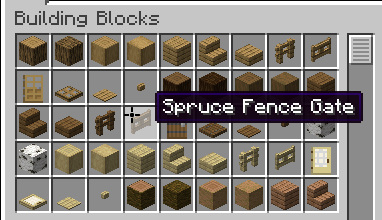


Cursor+
Replace Minecraft's default mouse cursor with a custom one.
Cursor+ is a lightweight Fabric mod that changes the system cursor Minecraft uses in menus and GUI screens. Simply install the mod and the default cursor is replaced automatically.
Features
- Replaces Minecraft's default mouse cursor.
- Works in menus, inventories, and other GUI screens.
- Lightweight with no unnecessary features.
- No configuration required.
- Client-side only.
Compatibility
- Minecraft: 1.21.1
- Loader: Fabric
Installation
- Install the Fabric Loader.
- Download Cursor+.
- Place the mod in your
modsfolder. - Launch the game.
FAQ
Does this replace the in-game crosshair?
No. Cursor+ only replaces the operating system cursor that Minecraft shows while navigating menus and GUI screens. The gameplay crosshair is unchanged.
Does this work on servers?
Yes. The mod is entirely client-side and can be used on any server.
Does this require any configuration?
No. Install the mod and it works automatically.
Planned Features
- Multiple cursor styles.
- Custom cursor packs.
- Cursor customization options.
- Configuration menu.
🤝 Support & Feedback
Found a bug? Report it via our Discord. If you enjoy the plugin, leaving a star or a review helps support future updates.
- Edition: Minecraft Java
- File type: .jar
- Minecraft version listed: 1.21.1
- How to install: Install the matching mod loader (Forge, Fabric or NeoForge) for your Minecraft version. → Download the .jar. → Put it in the .minecraft/mods folder and launch that loader profile.
- Where to get it: Opens on Modrinth — not every file is mirrored on our own servers.
Install steps are the general flow for this file type — How to install Minecraft Java mods & modpacks walks through it step by step.
- Ships as PlusCursor-1.0.0.jar — drop this file into the mods folder
- Download size: 8 KB
- Download link checked 30 Aug 2026 — working
These come from our own check of the pack file, not from the source page.