
Armor Durability
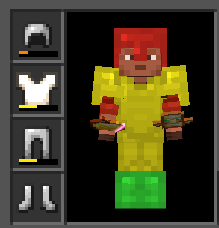
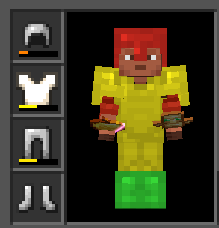
Visually tints players' armor by remaining durability.
How it works
The mod intercepts armor rendering on player models and blends in a color tint based on the item's current durability:
| Durability | Color |
|---|---|
| ≥70% | Green |
| 30–69% | Yellow |
| <30% | Red |
Both the armor layers and the enchantment glint are tinted.
Compatibility
- Minecraft 26.2, Fabric Loader ≥0.19.3
- Client-side only — no server installation needed
- Works with any texture pack or resource pack
Installation
- Install Fabric Loader
- Place the
.jarin yourmodsfolder - Done — no configuration required
Quick facts
- Edition: Minecraft Java
- File type: .jar
- Minecraft version listed: 26.2
- How to install: Install the matching mod loader (Forge, Fabric or NeoForge) for your Minecraft version. → Download the .jar. → Put it in the .minecraft/mods folder and launch that loader profile.
- Where to get it: Opens on Modrinth — not every file is mirrored on our own servers.
Install steps are the general flow for this file type — How to install Minecraft Java mods & modpacks walks through it step by step.
Verified by MCModsHub
- Ships as armordurability-1.0-SNAPSHOT.jar — drop this file into the mods folder
- Download size: 962 KB
- Download link checked 31 Aug 2026 — working
These come from our own check of the pack file, not from the source page.