
Java Optimized
Java modpack listed for Minecraft 1.21. Downloads from the MC Java Mods app on Android.
⬇ Download on Modrinth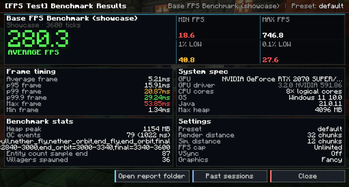
Java Optimization Pack
Java Optimization Pack is a lightweight Minecraft modpack designed to maximize performance without changing the vanilla experience.
It combines the best performance, memory optimization, and bug-fixing mods with carefully tuned configurations to deliver smoother gameplay, faster loading times, lower RAM usage, and significantly higher FPS.
Base FPS Benchmark (Showcase)
Average FPS: 280.3 Maximum FPS: 746.8 Benchmark Configuration
Preset: Default Render Distance: 32 Chunks Simulation Distance: 12 Chunks Graphics: Fancy VSync: Off FPS Limit: Unlimited Test System
GPU: NVIDIA GeForce RTX 2070 SUPER CPU: 8 Logical Cores Operating System: Windows 11 Java: 21.0.11 Maximum Heap: 4096 MB Notes
Performance results were recorded using the default benchmark settings above. Actual FPS may vary depending on hardware, drivers, shaders, resource packs, and Minecraft version.
- Edition: Minecraft Java
- File type: .jar
- Minecraft version listed: 1.21.1
- How to install: Install the matching mod loader (Forge, Fabric or NeoForge) for your Minecraft version. → Download the .jar. → Put it in the .minecraft/mods folder and launch that loader profile.
- Where to get it: Opens on Modrinth — not every file is mirrored on our own servers.
Install steps are the general flow for this file type — How to install Minecraft Java mods & modpacks walks through it step by step.
- Downloads as Java Optimized 1.0.0.mrpack java.mrpack
- Download size: 12 KB
- Download link checked 1 Nov 2026 — working
These come from our own check of the pack file, not from the source page.