
Golden Helmet Glow Resource Pack
Java resource pack listed for Minecraft 26.x. Downloads from the MC Java Mods app on Android.
⬇ Download on Modrinth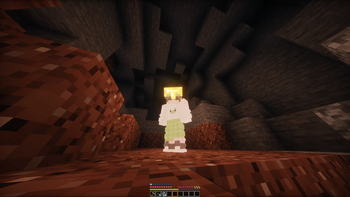

Golden Helmet Glow (Resource Pack)
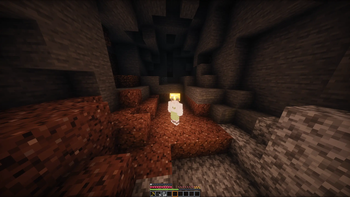
A tiny resource pack that makes a Golden Helmet glow like a torch — purely on the client side, no server installation required.

✨ Features
- Any player wearing a Golden Helmet in the head slot emits dynamic light (level 15), following them as they move.
- 100% client-side — nothing changes in the world, no blocks are placed, no server mod needed.
- Data-driven: a single JSON file defines the rule, no code involved.
- Instant on/off — the glow appears and disappears the moment the helmet is equipped or removed.
⚙️ How It Works
This pack adds an entity light-source rule for LambDynamicLights, a popular client-side dynamic lighting mod. The rule tells LambDynamicLights: "if a player has a golden helmet equipped in the head slot, treat them as a light source of luminance 15." LambDynamicLights then handles all the actual rendering, purely client-side, without touching real block light or requiring anything from the server.
Because it's a resource pack and not a mod, it works the same way texture packs do — only players who have both LambDynamicLights and this pack installed will see the glow, on themselves and on any other glowing player.
📦 Installation
- Install Fabric Loader for Minecraft 26.2.
- Install Fabric API and LambDynamicLights (4.12.2+26.2 or newer) — required, the pack does nothing on its own.
- Download this resource pack and drop it (as a
.zip, don't extract it) into.minecraft/resourcepacks. - In-game: Options → Resource Packs, move "Golden Helmet Glow" to the Selected list.
- Make sure
Dynamic Lightsis enabled in LambDynamicLights' settings (Options → Video Settings → Dynamic Lights, or via ModMenu).
Requirements
| Requirement | Version |
|---|---|
| Minecraft | 26.2 |
| Fabric Loader | 0.19.0+ |
| Fabric API | Required |
| LambDynamicLights | 4.12.2+26.2 or newer (required) |
🧩 Compatibility & Limitations
- Client-side only. This does not require server installation, and it works on any server — vanilla, modded, or with anti-cheat — since it never modifies the actual world.
- Only visible to players who also have it installed. Someone without LambDynamicLights + this pack won't see the glow at all, even if they're wearing the golden helmet themselves.
- Works alongside any other resource pack or mod that doesn't override LambDynamicLights' entity light rules for players.
- Not a substitute for the mod version of Golden Helmet Glow, which uses real block light visible to everyone on the server regardless of their client setup — pick whichever fits your use case.
🛠️ Customize It Yourself
The whole pack is one JSON file at
assets/goldenglow/dynamiclights/entity/golden_helmet_glow.json. You can edit:
"items"— swapminecraft:golden_helmetfor any other item."luminance"— a number from 0–15 (15 = torch-level brightness)."head"— change tomainhand,offhand,chest,legs,feet, orbodyto trigger off a different equipment slot.
- Edition: Minecraft Java
- File type: .zip (resource pack)
- Minecraft version listed: 26.2
- How to install: Download the .zip resource pack — do not unzip it. → Put it in .minecraft/resourcepacks. → Enable it in Options → Resource Packs.
- Where to get it: Opens on Modrinth — not every file is mirrored on our own servers.
Install steps are the general flow for this file type — How to install Minecraft Java resource packs walks through it step by step.
- Downloads as golden-helmet-glow-resourcepack.zip
- Download size: 72 KB
- Download link checked 1 Nov 2026 — working
These come from our own check of the pack file, not from the source page.