
Hologram Signs
Java data pack listed for Minecraft 26.x. Downloads from the MC Java Mods app on Android.
⬇ Download on Modrinth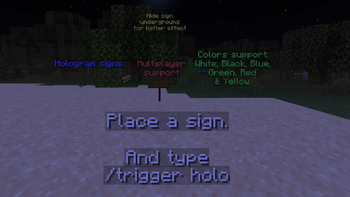
✨ Sign Holograms
Turn any sign into a floating hologram — instantly, with just a command. Ideal for realms or servers.
Ever wanted your shop signs, quest boards, or lore notes to pop? Sign Holograms lets you summon a glowing text display hovering above any sign, matching its dyed color, no plugins or mods required — pure vanilla datapack magic.
How it works
Stand touching a sign (on it, or right next to it) and run:
/trigger holo
That's it. A floating hologram of the sign's text appears 3 blocks above it — perfect for builds, servers, adventure maps, and shop displays.
Features
🪧 One command, zero setup — /trigger holo and you're done
🎨 Color-aware — dye your sign and the hologram matches it (White, Yellow, Green, Blue and Red)
🧹 Self-cleaning — break the sign, the hologram vanishes automatically
🔄 Refreshable — re-run the trigger to update a hologram if you edit the sign
⚡ Lightweight — pure vanilla commands, no external dependencies
Perfect for Shop and market signage Quest logs and NPC dialogue boards Build showcases and museum plaques Adventure map storytelling
- Edition: Minecraft Java
- File type: .jar
- Minecraft version listed: 26.2
- How to install: Install the matching mod loader (Forge, Fabric or NeoForge) for your Minecraft version. → Download the .jar. → Put it in the .minecraft/mods folder and launch that loader profile.
- Where to get it: Opens on Modrinth — not every file is mirrored on our own servers.
Install steps are the general flow for this file type — see the MC Java Mods guides for the full walkthrough.
- Downloads as SignHolograms v1.1.zip
- Download size: 7 KB
- Download link checked 11 Oct 2026 — working
These come from our own check of the pack file, not from the source page.