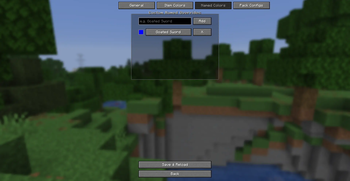
ZEEG — Zap's Enhanced Enchantment Glints
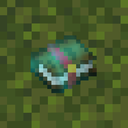
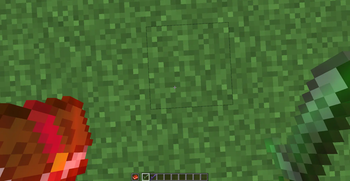
A lightweight client-side Fabric mod that allows you to customize your enchantment glints dynamically without resource packs.
Features
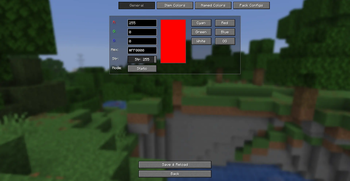
- Color Picker: Set any RGB or Hex Value
- Multiple Cycle Modes:
- Static: Single solid custom color.
- Rainbow: Smooth cycle through the spectrum.
- Duo-Tone: Alternating smooth transition between two custom colors.
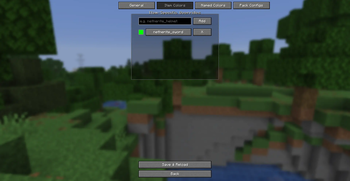
- Item-Specific Overrides: Assign unique glint colors to specific items (e.g., green for a Netherite Sword, red for a Bow).
- Custom Name Overrides: Color your glints dynamically based on item names renamed in an anvil.
- Resource Pack Configs: Pack creators can supply default glint configurations via custom resource packs.
- Intuitive GUI: Easy-to-use configuration screen accessible directly via Mod Menu.
- Native Integration: Compatible with the game's built-in glint strength and speed settings.
- Mod Compatibility: Works with any modded item.
- Developer & Datapack Friendly: Exposes the custom
zeeg:glintdata component, allowing other mods, datapacks, and/givecommands to easily set custom glint properties on any item.
Version Support & Branches
ZEEG supports multiple Minecraft versions:
- 1.21.11
- 26.1.x
- 26.2.x
Usage
- Install ZEEG on Fabric (requires Fabric API and Mod Menu).
- Open Mod Menu -> ZEEG -> Configure.
- Customize your colors, speeds, overrides, or cycle modes.
- Click Save & Reload to apply changes instantly in-game.
Resource Pack Usage
Resource pack creators can bundle default configuration presets, item-specific overrides, or named overrides within their packs. ZEEG will automatically detect and load these configs if enabled.
Create a JSON file named config.zg in your resource pack at:
assets/zeeg/config.zg
Example config.zg structure:
{
  "red": 0,
  "green": 255,
  "blue": 128,
  "strength": 255,
  "cycleMode": 1,
  "rainbowSpeed": 25,
  "itemColors": [
    {
      "itemId": "minecraft:netherite_sword",
      "red": 255,
      "green": 0,
      "blue": 0
    }
  ],
  "namedColors": [
    {
      "name": "Excalibur",
      "red": 255,
      "green": 215,
      "blue": 0,
      "strength": 255,
      "cycleMode": 2,
      "red2": 255,
      "green2": 255,
      "blue2": 255
    }
  ]
}
Commands Usage
You can use the /give command to obtain items with pre-configured custom glints by specifying the zeeg:glint data component.
Formats:
- Custom Glint on Enchanting:
/give @s minecraft:diamond_sword[zeeg:glint={r:255,g:255,b:0}] - Rainbow Glint:
/give @s minecraft:diamond_sword[zeeg:glint={cycle_mode:1,speed:50}] - Duo-Tone Glint: Transitions smoothly between red and blue:
/give @s minecraft:diamond_sword[zeeg:glint={cycle_mode:2,r:255,g:0,b:0,r2:0,g2:0,b2:255,speed:30}]
Available Component Fields:
r,g,b(Integer0-255): The primary RGB color (Default:255).strength(Integer0-255): Glint opacity/strength (Default:255).cycle_mode(Integer0-2):0= Static,1= Rainbow,2= Duo-Tone (Default:0).speed(Integer1-100): Shifting cycle speed (Default:25).r2,g2,b2(Integer0-255): Secondary target RGB color for Duo-Tone mode (Default:255).
Datapack Usage
Datapack creators can use the zeeg:glint component in loot tables, custom recipe results, or advancement rewards.
Example Loot Table Item:
{
  "type": "minecraft:item",
  "name": "minecraft:netherite_sword",
  "functions": [
    {
      "function": "minecraft:set_components",
      "components": {
        "minecraft:enchantment_glint_override": true,
        "zeeg:glint": {
          "r": 255,
          "g": 0,
          "b": 0,
          "cycle_mode": 2,
          "r2": 255,
          "g2": 128,
          "b2": 0,
          "speed": 15
        }
      }
    }
  ]
}
Mod Usage
Mod developers can read and modify glint components directly on ItemStack instances using the API.
Retrieve Glint Data:
import com.zapaxe.zeeg.GlintComponent;

GlintComponent glint = stack.get(GlintComponent.TYPE);
if (glint != null) {
    int red = glint.r();
    int green = glint.g();
    int blue = glint.b();
}
Apply Glint Data:
import com.zapaxe.zeeg.GlintComponent;

// Params: r, g, b, strength, cycleMode, speed, r2, g2, b2
GlintComponent customGlint = new GlintComponent(255, 0, 255, 255, 1, 20, 255, 255, 255);
stack.set(GlintComponent.TYPE, customGlint);
- Edition: Minecraft Java
- File type: .jar
- Minecraft version listed: 1.21.11
- How to install: Install the matching mod loader (Forge, Fabric or NeoForge) for your Minecraft version. → Download the .jar. → Put it in the .minecraft/mods folder and launch that loader profile.
- Where to get it: Opens on Modrinth — not every file is mirrored on our own servers.
Install steps are the general flow for this file type — How to install Minecraft Java mods & modpacks walks through it step by step.
- Ships as zeeg-1.0.0-1.21.11.jar — drop this file into the mods folder
- Download size: 61 KB
- Download link checked 31 Aug 2026 — working
These come from our own check of the pack file, not from the source page.