
Mushling - Arachnophobia Elimination
Java resource pack listed for Minecraft 26.x. Downloads from the MC Java Mods app on Android.
Mushling - Arachnophobia Elimination replaces spiders and cave spiders with friendly Mushling creatures, making Minecraft more comfortable for players…
⬇ Download on Modrinth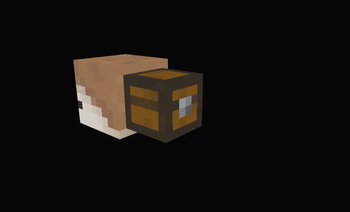

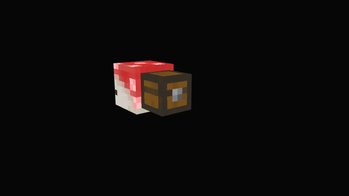
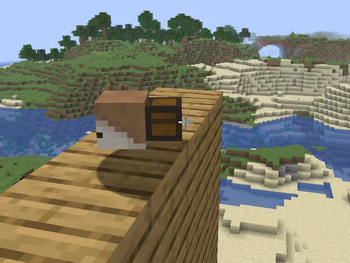
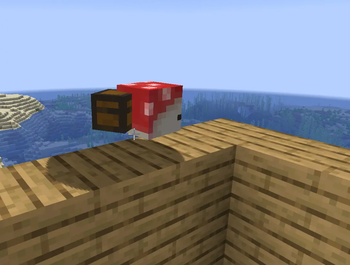
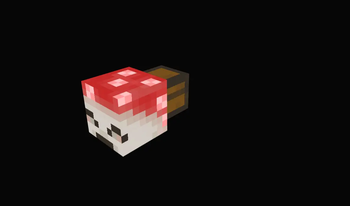
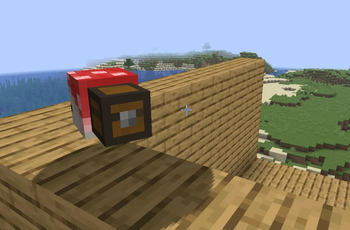
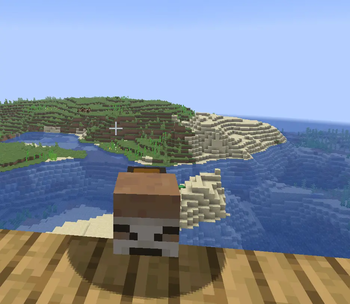
Mushling - Arachnophobia Elimination replaces every Spider and Cave Spider in Minecraft with adorable Mushling creatures, creating a more comfortable experience for players with arachnophobia or anyone who simply prefers not to encounter spiders.
This resource pack replaces Spider and Cave Spider spawn eggs, along with Spider Eyes, with Mushling-themed names and icons. All gameplay mechanics, hitboxes, animations, drops, and mob behaviour remain unchanged, making this resource pack fully compatible with vanilla Minecraft, modded clients, and multiplayer servers.
Lore: Mushlings are curious little mushroom creatures with an unusual fascination for string. They gather it wherever they can, store it in the chests on their backs, and weave it into large tangled nests that give them a cozy place to live while they preserve the familiar look and feel of Minecraft's caves.
Installation Guide (Minecraft Java Edition)
Windows
Download the Mushling - Arachnophobia Elimination resource pack (
.zipfile).Open Minecraft: Java Edition.
From the main menu, go to Options → Resource Packs.
Click Open Pack Folder.
Move or copy the downloaded
.zipfile into the resourcepacks folder.- Do not unzip the file.
Return to Minecraft. The resource pack should appear in the list.
Click the ▶ arrow to move it to the Selected column.
Click Done and enjoy a spider-free adventure!
macOS
Download the Arachnophobia Elimination resource pack (
.zipfile).Open Minecraft: Java Edition.
From the main menu, go to Options → Resource Packs.
Click Open Pack Folder.
Copy the downloaded
.zipfile into the resourcepacks folder.- Do not unzip the file.
Return to Minecraft. The resource pack should automatically appear in the list.
Click the ▶ arrow to enable it.
Click Done to apply the resource pack.
Alternative Folder Locations
If you need to find the folder manually:
Windows
%AppData%\.minecraft\resourcepacks
macOS
~/Library/Application Support/minecraft/resourcepacks
Tip: In Finder, press ⌘ + Shift + G and paste the macOS path above to jump directly to the folder.
Compatibility
- ✅ Minecraft: Java Edition
- ✅ Singleplayer
- ✅ Multiplayer servers
- ✅ Vanilla Minecraft
- ✅ Fabric
- ✅ Forge
- ✅ NeoForge
- ✅ Quilt
- ✅ Compatible with most modpacks (as long as they do not replace Spider or Cave Spider textures)
No gameplay mechanics are changed—only the appearance and names of Spider-related assets.
- Edition: Minecraft Java
- File type: .zip (resource pack)
- Minecraft version listed: 26.2
- How to install: Download the .zip resource pack — do not unzip it. → Put it in .minecraft/resourcepacks. → Enable it in Options → Resource Packs.
- Where to get it: Opens on Modrinth — not every file is mirrored on our own servers.
Install steps are the general flow for this file type — How to install Minecraft Java resource packs walks through it step by step.
- Downloads as Mushling_Arachnophobia_Elimination.zip
- Download size: 20 KB
- Download link checked 12 Oct 2026 — working
These come from our own check of the pack file, not from the source page.