ModsJava
Omnibed
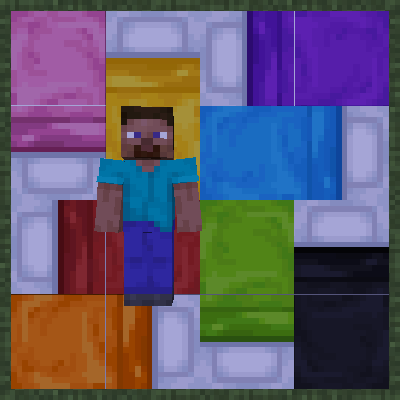
Break free from vanilla Minecraft’s rigid “sleep straight” rules! OmniBed lets players lie down in any direction across multiple connected beds, bringing…
⬇ Download on ModrinthOmniBed | 拼好床 🛏️
Break free from vanilla Minecraft’s rigid “sleep straight” rules! OmniBed lets players lie down in any direction across multiple connected beds, bringing you and your friends the most authentic “big bed rolling” experience in multiplayer.
✨ Core Features
- Omnidirectional sleeping: Supports sleeping across two adjacent beds. Whether sideways or diagonally, as long as your facing direction (front, back, left, right) has two continuous empty bed spaces, your body will automatically align perfectly with the bed layout.
- Smart bed allocation: No more fighting over bedheads in multiplayer! If the bed you click is already occupied, the system will intelligently “slide” you into a nearby empty bed space.
- Dual respawn protection: Your respawn point is bound to two bed blocks at once. Even if half of the bed is destroyed, as long as the other half remains, your respawn point stays valid.
- Perfect multiplayer sync: Built on native entity DataTracker synchronization, other players will see your “sprawled out” sleeping pose exactly as it is — no clipping issues.
- Minimalist and pure: Ultra-lightweight design,seamlessly fitting into the vanilla survival experience.
🎮 How to Use
Exactly the same as vanilla — zero learning curve:
- Place two or more beds side by side (any colors, any arrangement).
- Stand next to the bed and right-click in the direction you want to lie down.
- Enjoy your giant bed!
(Note: If any bed block under you is destroyed while sleeping, you’ll be safely awakened.)
Quick facts
- Edition: Minecraft Java
- File type: .jar
- Minecraft version listed: 1.20.1
- How to install: Install the matching mod loader (Forge, Fabric or NeoForge) for your Minecraft version. → Download the .jar. → Put it in the .minecraft/mods folder and launch that loader profile.
- Where to get it: Opens on Modrinth — not every file is mirrored on our own servers.
Install steps are the general flow for this file type — How to install Minecraft Java mods & modpacks walks through it step by step.
Verified by MCModsHub
- Ships as omnibed-1.0.0.jar — drop this file into the mods folder
- Download size: 33 KB
- Download link checked 5 Sept 2026 — working
These come from our own check of the pack file, not from the source page.