
Vanilla Helper
Java mod listed for Minecraft 26.x. Downloads from the MC Java Mods app on Android.
A lightweight Fabric utility mod that adds small quality-of-life improvements to make Minecraft smoother and more enjoyable.
⬇ Download on Modrinth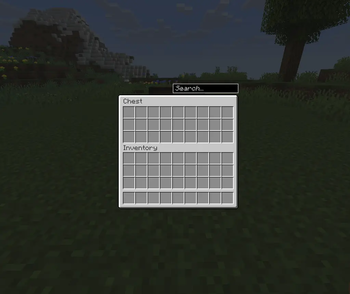
🧰 Vanilla Helper
Quality-of-life helpers for vanilla Minecraft — fair-play, client-side only, compatible with any server.
Vanilla Helper adds the small conveniences vanilla always needed, without ever giving you an unfair advantage. Everything runs on your client: install it, join any vanilla or modded server, and it just works. Every feature can be toggled and fine-tuned individually from an in-game settings screen (default key: V).
✨ Features
🔍 Container search — a search bar above every container; non-matching items are dimmed (or matches highlighted). Searches names, IDs, tooltips (enchantments, potions) and even inside closed shulker boxes and bundles. Ctrl+F to focus.
📊 Mini-HUD — coordinates, facing, biome, FPS and an in-game clock. Pick the corner, reorder the lines, choose from 9 colors.
🛡️ Protections — durability alerts, nearly-broken tool protection, double-press drop confirmation (with your own custom item list), and misclick protection for villagers, iron golems and named/tamed animals. Sneak to bypass any of them.
🔭 Zoom — hold C to zoom in (adjustable factor).
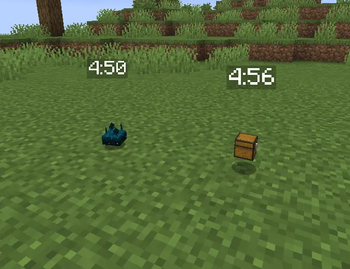
⏱️ Item despawn timer — color-coded countdown above dropped items before they despawn.
💀 Death coordinates — your death spot posted in chat on respawn, plus a warning before your items despawn.
📋 Copy coordinates — F6 copies your position to the clipboard (plain or as a /tp command).
🔢 Item counter — tooltips show how many of an item you own across your inventory and the open container.
⚖️ Fair play by design
The settings screen groups features into two categories:
- Fair play — everywhere: honest helpers, fine on any server
- Singleplayer only: features that would be unfair in multiplayer (exact phantom timer, weather forecast…) live here and are automatically disabled when you join a server — whatever the config says
🗺️ Planned
One-click chest sorting, quick-stack to containers, ModMenu integration, and more.
📦 Requirements
- Fabric Loader + Fabric API
- Client-side only — nothing to install on the server
Le mod est intégralement traduit en français. 🇫🇷
- Edition: Minecraft Java
- File type: .jar
- Minecraft version listed: 26.2
- How to install: Install the matching mod loader (Forge, Fabric or NeoForge) for your Minecraft version. → Download the .jar. → Put it in the .minecraft/mods folder and launch that loader profile.
- Where to get it: Opens on Modrinth — not every file is mirrored on our own servers.
Install steps are the general flow for this file type — How to install Minecraft Java mods & modpacks walks through it step by step.
- Ships as vanilla-helper-0.1.0.jar — drop this file into the mods folder
- Download size: 139 KB
- Download link checked 15 Oct 2026 — working
These come from our own check of the pack file, not from the source page.