
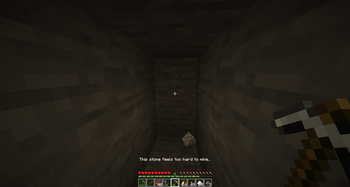
Hard Rocks is a simple mod to make mining more challenging and realistic while staying faithful to Minecraft's core design.
Stone/Deepslate that is exposed in caves, cliffs and mountains can be mined normally. But the deeper you dig into solid rock, the harder it becomes.
Hardened stone cannot be mined with regular tools, while diamond or netherite pickaxes can only break it very slowly. You can check to see if stone is hard by right clicking it with a pickaxe or stick.
To mine hardened stone, use TNT to fracture the surrounding stone, then mine the fractured stone around the blast site as normal. The radius within which TNT softens stone can be configured using the command:
/hardrocks fractureDepth <value>
This gives TNT a more of a purpose and makes mining feel more realistic, rewarding and deliberate, while still fitting naturally into Vanilla+ and realism modpacks.
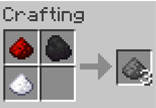
Hard Rocks also adds a simple gunpowder recipe: combine sugar, redstone and coal or charcoal anywhere in a crafting grid.
- Edition: Minecraft Java
- File type: .jar
- Minecraft version listed: 1.21.1
- How to install: Install the matching mod loader (Forge, Fabric or NeoForge) for your Minecraft version. → Download the .jar. → Put it in the .minecraft/mods folder and launch that loader profile.
- Where to get it: Opens on Modrinth — not every file is mirrored on our own servers.
Install steps are the general flow for this file type — How to install Minecraft Java mods & modpacks walks through it step by step.
- Ships as hard-rocks-0.1.0.jar — drop this file into the mods folder
- Download size: 32 KB
- Download link checked 5 Sept 2026 — working
These come from our own check of the pack file, not from the source page.