
Kairo's Fire Customizer
Java mod listed for Minecraft 26.x. Downloads from the MC Java Mods app on Android.
I don't know my version or loader
Kairo's Fire Customizer
Take full control of how fire looks.
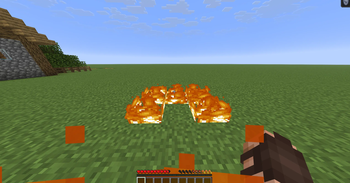
Lower it, fade it, shrink it, or hide it entirely, both the flames on your screen and the fire burning in the world. Everything is 100% client-side and render only.
Features
First Person Fire
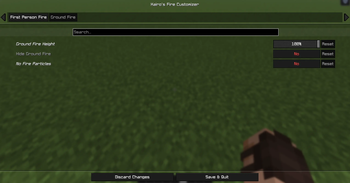
- Move the flames on your screen down or up while you're burning.
- Adjust the opacity of the flames from 10%–100% to see through them.
- Hide the first person fire completely.
Ground Fire
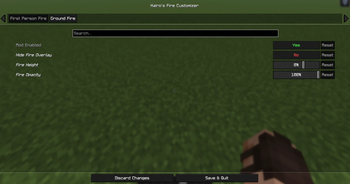
- Shrink fire burning on blocks from 100% down to 10% height.
- Hide fire completely.
- Remove the smoke particles that fire gives off.
- Be aware some resource packs with custom fire already sets the height and will not be changed by this mod.
Settings
Open the configuration through Mod Menu, or bind the Open Fire Settings key in Options → Controls.
Two tabs (First Person Fire, Ground Fire). Every setting includes a tooltip and can be reset individually. Ground fire changes apply with a quick automatic resource reload when you save.
Requirements
- Fabric Loader
- Fabric API
- Cloth Config
- Edition: Minecraft Java
- File type: .jar
- Minecraft versions listed: 26.1, 26.1.1, 26.1.2
- How to install: Install the matching mod loader (Forge, Fabric or NeoForge) for your Minecraft version. → Download the .jar. → Put it in the .minecraft/mods folder and launch that loader profile.
- Where to get it: Opens on Modrinth — not every file is mirrored on our own servers.
Install steps are the general flow for this file type — How to install Minecraft Java mods & modpacks walks through it step by step.
- Ships as KairosFireCustomizer-1.1.3+26.1-26.1.2.jar — drop this file into the mods folder
- Download size: 365 KB
- Download link checked 5 Nov 2026 — working
These come from our own check of the pack file, not from the source page.